
Bookkeeping operations
Bank Statement OCR and No-Touch Reconciliation: How It Works
A deep, evidence-backed guide to bank-statement OCR and no-touch reconciliation: how the extraction pipeline works, what the machine reads on a statement, where it still breaks, and how LedgerHQ's statement OCR feeds reconciliations — verified against the real product.

The short answer
The bank statement is the last paper artifact in bookkeeping. Every other input to the books — invoices, receipts, payroll reports — arrived as data years ago, or at least as data-shaped PDFs. The statement is still a document designed for human eyes: a PDF laid out for reading, not for importing. Bank-statement OCR is the technology that converts that document back into data — dates, descriptions, amounts, and balances as structured rows a machine can match against the register.
No-touch reconciliation is what that unlocks. Once the statement exists as data, software can do the line-by-line matching itself: statement line against register row, thousands of pairs, no human typing or clicking through matches. "No-touch" does not mean nobody looks — it means nobody touches the routine work. The human's job moves to the only part that ever needed judgment: the difference report, the handful of lines that didn't tie.
The honest version of the pitch, up front: statement OCR is genuinely good now — good enough that the verification step is arithmetic, not eyeballing. But it is not magic. Banks redesign their statement layouts without telling anyone. Scanned paper statements read worse than digital PDFs. And a confident misread of an amount is the one error that matters, which is why every serious pipeline validates extraction against the statement's own balances before a single row touches the books.
This guide walks the whole stack: why the statement is the bottleneck, how the extraction pipeline actually works, what the machine reads on a statement (and what each field is for), what "no-touch" precisely means, where it still breaks, and how LedgerHQ's statement OCR is built — verified against the real product, not the marketing page.
Why the statement is the bottleneck
Start with an uncomfortable fact about bank data in 2026: there is no API for "the statement." Bank feeds (Plaid and its competitors) stream transactions, and they're excellent at it — but a feed is a stream of activity, not a statement. The statement is the bank's signed declaration: this is what we say happened, and this is the balance we say you have. Reconciliation is the act of proving the books agree with that declaration. The feed tells you what moved; only the statement tells you where you stand.
And the statement arrives as a PDF designed in the 1990s for a human holding paper. Consider what that means in practice:
- Every bank lays it out differently. Column orders, date formats, description truncation, the placement of the running balance — Chase's statement is not Wells Fargo's, and neither matches a regional credit union's. There is no standard.
- Layouts change without notice. Banks redesign statements, merge, rebrand, and migrate platforms. A parser trained on last year's layout silently misreads this year's.
- "PDF" is not a data format. A digital PDF has a text layer a machine can read directly; a scanned paper statement is just a photograph of text. Same file extension, completely different extraction problem. Many small-business statements still arrive as scans — photographed, faxed, or printed-and-rescanned through a client portal.
- The edge cases live in the images. Check images, deposit slips, and multi-page consolidated statements for multi-entity clients all ride along as pictures inside the PDF.
The market has noticed the bottleneck. Intelligent document processing — the industry's name for this stack — was roughly a $10.4B market in 2025, headed toward ~$89B by 2034 at about 27% annual growth, with banking and financial services the largest slice (Fortune Business Insights, via DocSumo, 2026). Estimates vary widely by forecaster — Precedence Research puts 2025 at just $3.2B — but every one of them agrees on ~25–34% yearly growth with BFSI on top. Money follows friction, and the friction is real: only 10% of UK organisations report highly automated banking and payment workflows, roughly 1 in 5 still depend mainly on manual processes to match bank transactions to internal records, and about a quarter of finance leaders lose 20–29 hours a month to manual bank and payment admin (Finexer study of 418 senior leaders, via IT Brief, September 15, 2026).
So the traditional workflow, still running at thousands of firms: download the PDF, key every line into the books (or into a spreadsheet, then import), then go line by line against the register, then chase the difference. Before a single line is even read, there's the collection tax: Hubdoc's old worked example had 20 clients × 4 accounts at 3 minutes per login-and-download — 4 hours a month of pure download labor before reconciliation even starts (Hubdoc, "Hours to Minutes" guide). Then the keying, which is expensive in two currencies — time and errors. The NYU Stern School of Business working paper on routine data entry measured a 2.41% keystroke error rate during normal keying (IS-90-01) — roughly one bad keystroke in every forty. Dr. Ray Panko's research finds ~5% error on simple data-entry work, with "even forgiving studies" landing around 1% (via Conexiom). On a 150-line statement, that's several wrong numbers keyed in by a careful, experienced operator, each one a future reconciliation difference to chase. The counterpoint, from a peer-reviewed PLOS ONE study: automated forms processing matched double-key human quality — 0.046 errors per 1,000 fields, the same as two humans checking each other (Paulsen et al., 2012). The machine doesn't get tired on line 137 — and at its best, it keys like two careful humans checking each other, at machine speed. That, more than speed, is the real argument for OCR: the error rate of the process drops because the most error-prone step — human retyping — disappears.
How statement OCR actually works
"OCR" undersells it. Optical character recognition — turning pixels into characters — is one stage of a five-stage pipeline. Here's the full stack, in the order a statement actually flows through it:
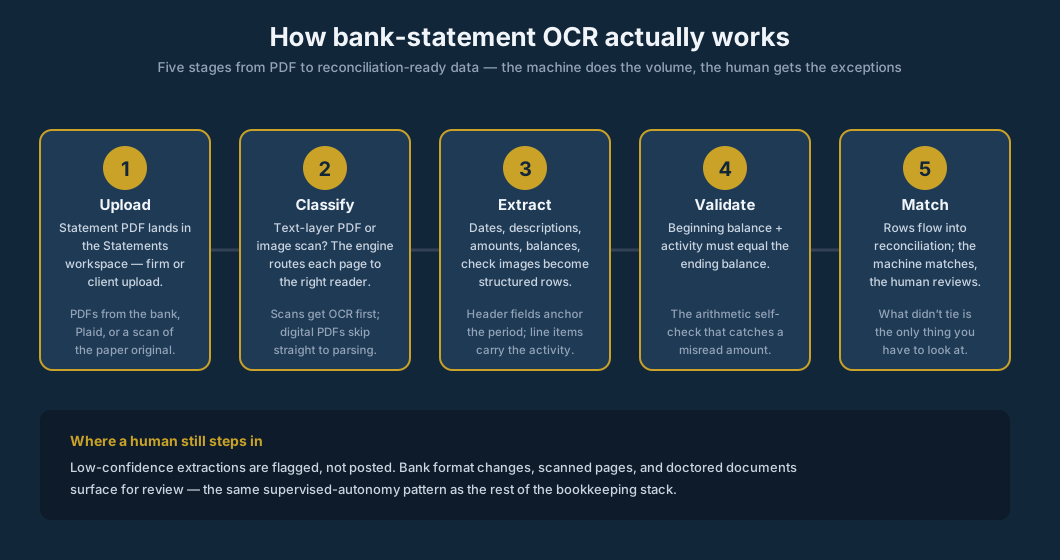
Stage 1 — Upload. The statement PDF lands in a statements workspace. In a firm workflow this is the intake step: the firm uploads it, the client uploads it through a portal, or it arrives from the bank's document vault via the feed provider. Intake quality determines everything downstream — a clean digital PDF and a third-generation fax scan are different universes, and the pipeline needs to know which one it got.
Stage 2 — Classify. The engine asks a simple question per page: is this a text-layer PDF or an image? Digital PDFs skip straight to parsing — the text is already there, with coordinates. Scans get OCR first, and this is where quality lives or dies: skewed pages get deskewed, low-contrast scans get enhanced, and page orientation gets corrected. A surprising amount of "OCR accuracy" is actually image preprocessing.
Stage 3 — Extract. This is the AI step, and it's really two extractions. First the header fields: the statement period, the account identity, the beginning and ending balances — the anchors. Then the line items: every transaction row as date, description, amount (and direction — debit or credit), plus the running balance where the bank prints one. Modern extractors use vision-language models that read the page the way a person does — understanding that the number in the right column belongs to the description on the left — rather than the old template approach of "the amount is always at x=612." Templates break when the bank redesigns; layout-understanding generalizes.
Stage 4 — Validate. This is the stage that separates serious pipelines from demos, and it's pure arithmetic: beginning balance + signed activity must equal the ending balance. The statement tells you all three numbers. If the extraction is right, they tie; if any amount was misread, they don't. The running-balance column gives a second, finer check — recompute it row by row and the first row that diverges pinpoints the misread line. No human does this math on 150 lines; the machine does it in milliseconds, and it's the reason extraction errors get caught rather than posted.
Stage 5 — Match. The validated rows flow into reconciliation as the statement side of the comparison. The matching engine pairs each statement line with its register row — exact matches on amount and date first, then fuzzy matching on near-dates and normalized descriptions, then transfer-pair detection so money moving between the client's own accounts isn't double-counted as income and expense. What doesn't match becomes the difference report. That report — five lines out of 150, say — is the entire human workload. Everything else was touched by nobody.
How accurate is it, really?
Vendor pages will tell you 99%: DocuClipper claims 99.6% accuracy on bank-statement conversion (vendor claim, 2026), Hubdoc claims 99% OCR capture accuracy (vendor claim, via fahimai.com). Treat every one of these as marketing until it's measured on your statements — ParserData's January 2026 essay calls this the "99% accuracy trap," noting that many tools boast 99% while the number is never independently verified (ParserData, Medium, January 5, 2026 — itself a vendor making a 99% claim, which tells you how the game is played).
The independent measurements are more interesting, and more honest. FinCriticalED, an academic benchmark published November 2025, evaluated 13 state-of-the-art vision systems at the fact level: Financial Fact Accuracy ranged from 65.68% to 97.23% — even though surface text-similarity scores were near-saturated (up to 98.84% ROUGE-1). A 0.12-point ROUGE gap concealed a 7.22-point drop in fact accuracy. And the errors concentrated exactly where bookkeepers would fear: numerical values and monetary units were consistently the most vulnerable fields, with critical errors clustering in visually complex, mixed-layout documents (arXiv 2511.14998, November 2025). Translation: the better the OCR looks at a glance, the less the glance tells you. What matters isn't character accuracy — it's whether the amounts are right.
The community is trying to fix the measurement gap. The Bankstatemently Open Benchmark (updated September 2026) publishes 15 synthetic bank and credit-card statements across three difficulty tiers, 12 countries, 8 languages, and 41 named parsing challenges — scanned PDFs, bilingual headers, Buddhist-era dates, multi-currency, separate debit/credit columns, running-balance cross-checks — scoring both raw parsed values and normalized canonical values. On an easy statement, per-field scores run date .99, description .95, amount .97, balance .97. The project's founding complaint: "Every tool claims high accuracy, but there's no shared dataset to verify against."
The practitioner's synthesis, from people who run these pipelines: best practice is to check for a text layer first and only run OCR when none exists — never read amounts off a page image when the text layer is sitting right there (onewave-ai, 2026). And the validation hierarchy matters: a "printed" opening balance, read off the statement and independently checked, beats a "derived" one inferred from the first row — because a wrong first row and a wrong opening balance cancel out and the chain still ties (los-agentic-ai). One practitioner shop claims roughly 1 in 7 statements fails the arithmetic tie-out on the first pass — an unverified repo claim, but directionally it's the point: the self-check is load-bearing, not decorative.
What the machine reads: anatomy of a statement
Not every field on a statement matters equally, and the extraction pipeline treats them differently. Here's the anatomy, with what each region is for:
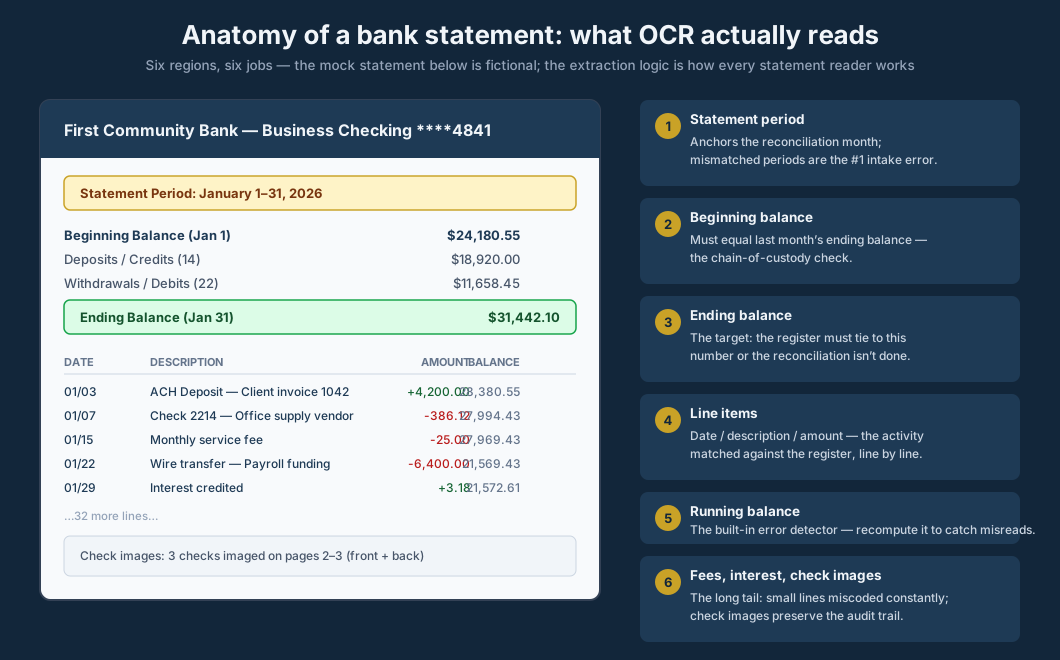
The statement period anchors the reconciliation month. This sounds trivial until you've seen a firm reconcile January against a statement that actually covers December 28–January 27 (banks love mid-month cycles). Period mismatch is the most common intake error, and it's the first thing the pipeline checks: does this statement cover the month we're closing?
The beginning balance is the chain-of-custody check. It must equal last month's ending balance to the penny. If it doesn't, something is wrong upstream — a prior period was reopened, a statement is missing, or the wrong account's statement was uploaded. Catching this at intake saves the classic nightmare of reconciling three months to find a gap that was in month one.
The ending balance is the target. The entire reconciliation exists to prove the register agrees with this number. In LedgerHQ's documented workflow, reconciliation is explicitly defined as confirming "that a bank or credit card register agrees with a statement ending balance" — the statement's number is the ground truth, and the session finishes "at zero difference" (LedgerHQ docs, Banking & Reconciliation, verified September 2026).
The line items — date, description, amount per row — are the activity to match. Descriptions are the messiest field: banks truncate them ("CHK 2214" tells you nothing; "ACH DEBIT VENMO" tells you slightly more), and the same vendor appears under different strings month to month. This is why matching uses normalized descriptions plus amount-plus-date rather than description alone.
The running balance is the built-in error detector. Most statements print it, and it's the field that makes extraction self-verifying: recompute it from the extracted amounts and any divergence flags the exact misread row. Pipelines that ignore the running balance are leaving their best validation signal on the table.
Fees, interest, and check images are the long tail. Bank fees and interest are small lines that get miscoded constantly (fee income vs. expense, interest categories) — small dollars, real noise. Check images matter for the paper trail: when a check amount is disputed, the image is the evidence, and extraction pipelines that capture check images alongside the data keep the audit trail intact.
"No-touch" reconciliation, precisely defined
The phrase gets thrown around, so let's define the ladder precisely. There are four levels, and "no-touch" is the top one:
| Level | What happens | Human touches |
|---|---|---|
| Manual | Download, key every line, match line by line | Everything |
| Assisted | Bank feed imports activity; human codes and clicks matches | Coding, matching, review |
| High auto-match | Statement extracted; engine matches the routine 80–90%; human reviews exceptions | Exceptions, sign-off |
| No-touch | Statement extracted, matched, difference pre-built; human reviews only what didn't tie | The difference report |
Two things to notice. First, the jump that matters is from assisted to high auto-match — that's where the keying and the clicking disappear. The reconciliation-automation practitioner's guide puts the sensible target at 80–90% automation, handling the remaining 10% manually rather than building fragile rules for every edge case (ToolsInfo, Complete Guide to Reconciliation Automation). Chasing 100% is how firms build matching logic their auditors reject. The incumbents work the same way: Xero's auto bank reconciliation only auto-reconciles statement lines meeting mandatory high-confidence criteria, and every reconciled line is labeled with its method — Rule, Match, Memory, or Prediction — so the automation is auditable after the fact (via Palladium Financial Group, September 2026). Enterprise platforms expect 90–95% automatic match rates (SmartStream/Celent), and vendor case studies document 95% match rates with halved error risk (Fiserv, Frontier Reconciliation) — vendor numbers, but the shape is consistent: the machine takes the routine bulk, the human takes the rest.
Second, the human never leaves the top of the ladder. No-touch means nobody touches the routine work — the statement still gets reviewed, the difference still gets resolved, and a human still signs off. The profession's posture on this is settled: supervised autonomy with the human in the lead, not lights-out automation. What changes is what the human touches: judgment instead of keystrokes. And the adoption data says this is still early days: Financial Cents' 2026 survey found document and receipt extraction/OCR in use at 38% of AI-active firms, but only 20% use dedicated AI bookkeeping tools — and by task, bank reconciliation sits near the bottom, with just 24% using AI for it (versus 75% for drafting emails). The firms already doing this have a head start measured in years, not months.
The time math is stark. A practitioner account from September 2026 describes automated statement matching taking reconciliation "from a half-day task per client to a 20-minute review task" — the AI does the matching, a human checks the exceptions (Lilach Bullock, September 2026). The chart below puts the shape of that change on a single monthly statement:
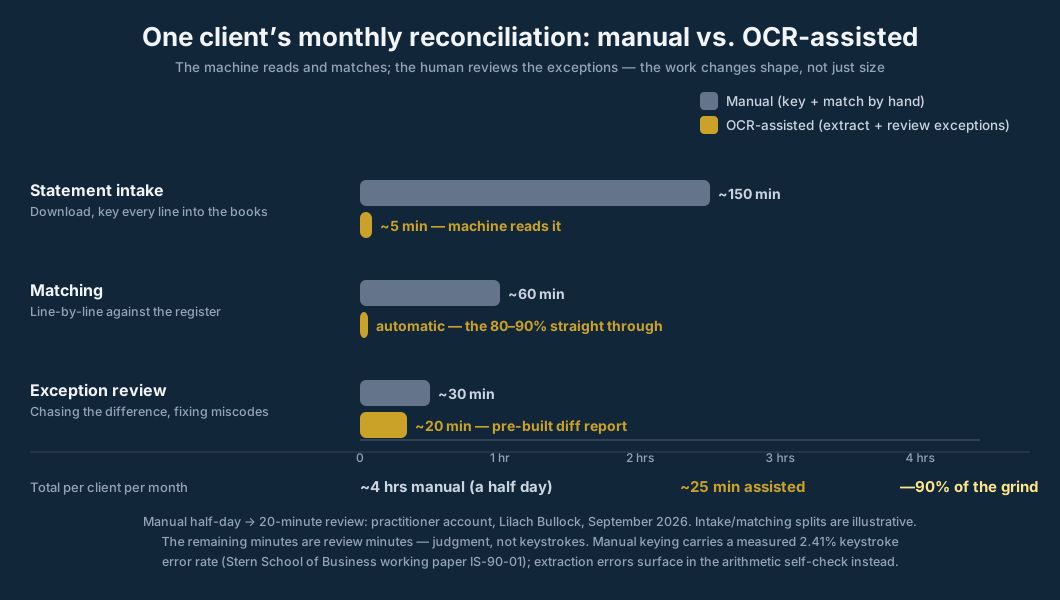
Read the chart carefully: the assisted column isn't just shorter, it's a different kind of work. The manual column is keystrokes and eyeball-matching — work that scales with line count and degrades with fatigue. The assisted column is review work — it scales with exceptions, which is a much smaller number and the number that actually needs a professional.
The worked example: a 40-client firm, statement season
Take a 12-person bookkeeping firm with 40 small-business clients — the mid-sized practice the industry data describes. Each client averages two statements a month to reconcile (one checking, one card — conservative for businesses with savings, loans, or multiple entities). That's 80 statements a month, 960 a year.
Manual baseline. At a half day per client per month for reconciliation (the practitioner figure above — and note that covers the matching, not just the statement), the firm spends roughly 160 hours a month on reconciliation work. At a $55/hr blended cost, that's $8,800 a month, $105,600 a year — on proving the books agree with the banks. And every one of those 960 statements was keyed by a human at a measured ~2.4% keystroke error rate, which means the firm also pays the downstream cost: the differences that have to be chased because a number was mistyped, not because anything was actually wrong.
OCR-assisted. Cut the per-client reconciliation to the 20-minute review, and the same 40 clients take about 13 hours a month. At the same blended rate: ~$715 a month, ~$8,580 a year. The gross saving is on the order of $97,000 a year — but apply the honesty discount this site's AI-in-bookkeeping guide established: roughly 40% of promised AI productivity is lost to verification and rework (the verification tax). Net saving: ~$58,000 a year, plus the error-rate dividend — extraction validated by arithmetic doesn't mistype line 137.
The deeper point isn't the dollar figure — it's what the 147 freed hours a month become. They don't vanish; they convert from keystroke work to the work the Financial Cents 2026 survey says firms actually want: client communication, advisory, and review. The firm that treats OCR as a headcount cut gets a smaller firm. The firm that treats it as capacity gets a bigger one — which is the entire 200-client thesis: lower prices, more clients, AI doing the volume.
The named cases point the same direction, with the usual vendor-commissioned caveats. Steirman CPAs reported a 60-hour bookkeeping reduction across their first 40 onboarded clients and said they avoided hiring three accountants — a claimed $312K a year (via Botkeeper partner announcement, vendor-commissioned, via FinTecBuzz). DSJCPA said automation freed 92 billable hours a week of staff and senior-accountant time for advisory work (Botkeeper case study, vendor). Tm2 reported saving 30 hours a week on transaction categorizing, 5 a week reconciling deposits, and 10 hours a month reconciling revenue for a single client — 720+ labor hours firm-wide (Botkeeper "For Dummies" e-book, vendor-commissioned).
The independent accounts are smaller and more credible. A 12-person Surrey practice's bookkeeper went from ~12 hours a week on data entry and receipt-chasing to ~4 after changing the client onboarding pack — Dext app plus bank rules for the 15 highest-volume clients — and the two clients who refused the app got 15% fee increases at renewal to cover manual handling (Lilach Bullock, September 2026). An independent 90-day, 3-client test of Hubdoc cut bank reconciliation from 3 hours to 45 minutes and data entry from 12 hours a month to 2 — with the tester's warning attached: "don't rely 100% on the OCR — review extracted data," and two bank connections broke mid-test (fahimai.com, February 2026).
And the epilogue the industry should sit with: Botkeeper — the company behind three of the vendor case studies above — shut down in February 2026. Its founder's closing statement claimed the platform was "autonomously reconciling accounts, and coding 80%+ of transactions with a staggering 98% accuracy" — company claims, never independently measured — yet the business failed as incumbents added AI and AI-native startups raised billions (CFO Brew, February 17, 2026). Automation capability is not a durable product. For a firm buying statement OCR today, that's actually reassuring: the capability survived; it just lives inside the platforms now — including the one this article is published on.
Where it still breaks
Intellectual honesty requires the failure modes, because statement OCR fails in specific, predictable ways — and knowing them is what separates a firm that benefits from one that gets burned.
The bank redesigns the layout. This is the #1 operational risk. Template-based extractors silently misread the new format; even layout-understanding models can stumble on a radically redesigned statement. The defense is the arithmetic self-check (stage 4): a layout change that breaks extraction breaks the balance tie-out, which surfaces the statement for human review instead of posting garbage. Any vendor that can't explain what happens when the bank redesigns is selling a demo.
Scans read worse than digital PDFs. A clean digital PDF has a text layer; a scan is a photograph. Skew, low contrast, fax artifacts, and coffee stains are all real-world inputs. Extraction quality degrades on bad scans — which is exactly why the pipeline classifies pages first and why firms should push clients toward digital statements (most banks offer them; many clients just never switched).
A confident amount misread is the dangerous error. Misreading a description is noise; misreading an amount is a wrong book. This is the field where confidence gating matters most: amounts below the confidence threshold get flagged, not posted, and the balance validation catches the rest. The rule for evaluating any statement-OCR product: ask what happens on a low-confidence amount. "We post it anyway" is disqualifying.
Doctored statements are a fraud vector, not just an error vector. The uncomfortable truth: OCR reads what the document says, and a forged PDF says lies fluently. Statement OCR is not forgery detection. The cases are recent and ugly. In July 2026, National Mortgage News reported bankers warning that AI-generated receipts, pay stubs, and forms now "appear legitimate upon review," driving a purported rise in expense-account fraud — with calls for enhanced verification tools. (Fake-document fraud predates AI: Fannie Mae warned in 2018 about a three-year phony-employer scam.) In September 2026, the DOJ's Middle District of Florida announced Kenneth Blair's 30-month sentence for bank fraud: he prepared fictitious pay stubs and altered bank statements showing "vastly overstated account balances" to qualify unqualified borrowers — a scheme that ran in 2020–2021 and then again in 2025, netting a $305,000 wrongful Georgia home loan that lenders failed to catch. The same month, a North Texas grand jury indicted four people in a sweeping $7.3M FHA/VA mortgage fraud scheme built partly on falsified bank statements in loan-qualification files; HUD has already paid $493,499+ in partial FHA-insurance claims (DOJ, September 2026).
The classic warning is Parmalat: auditors received a faxed Bank of America confirmation of a $4.9 billion account that was fake — an employee had scanned the BoA logo to manufacture the letterhead. The profession's standing lesson, per The CPA Journal: any critical evidence obtained from the client and printed from a computer may be fictitious and demands heightened skepticism; bank statements obtained directly from the bank outrank client-provided ones in the reliability hierarchy. Firms handling client-uploaded statements — especially for lending, audits, or new-client onboarding — need verification beyond extraction: direct bank confirmation, feed cross-checks, or document-forensics tooling. The statement is evidence; extraction doesn't authenticate it.
Auditors are (rightly) skeptical of OCR-sourced data. The hierarchy point is the auditor's version of this article's thesis: the statement is evidence, and evidence has a chain of custody. A statement pulled directly from the bank outranks one the client emailed you — which is exactly why serious platforms distinguish feed-provided statements from client uploads, and why coverage tracking treats "received unverified" as its own state rather than lumping it with verified. OCR doesn't change the hierarchy; it just reads faster. And the profession's trust data says firms know it: 26% of non-AI-using firms cite accuracy and trust in outputs as their biggest barrier to AI adoption — the #1 blocker, ahead of data security and client confidentiality at 22% (Financial Cents, 2026). The professional standard underneath is settled law: the practitioner remains responsible for the work product regardless of the tools used (AICPA SSTS §1.4). OCR changes how the data gets into the books, not who stands behind it.
How LedgerHQ does it
The pipeline this article has been describing isn't hypothetical — it's how LedgerHQ handles statements, and every claim below was verified against the real product or its codebase (not asserted from memory):
Statements live in a dedicated workspace. LedgerHQ's public docs describe the Statements workspace directly: "Statement PDFs and uploads live in the Statements workspace. LedgerHQ can store Plaid-provided statements, firm uploads, and client uploads. OCR/extraction reads structured statement data when available, and statement coverage policies track which account/month periods are verified, received unverified, mismatched, waived, or missing." (ledgerhq.ai/docs/modules/banking — Banking & Reconciliation, verified September 2026.) Note the last distinction, because it matters: "Statements support reconciliation and close, but they are not the reconciliation itself. A verified statement period means the firm has statement evidence. It does not mean the register is already reconciled." The statement is the evidence; the reconciliation is still the work.
The extraction runs as a real pipeline, not a button. In the ledgerhq-pro codebase: a standalone worker (scripts/workers/statement-ocr-worker.ts) drains a statement-OCR queue — batch claiming, leases, retries, budget limits — running Claude-based PDF extraction (lib/banking/statement-extraction-claude.ts), with an extract endpoint per statement (app/api/v1/bank-statements/[statementId]/extract/route.ts) and a finish-reconciliation route that closes the loop. Queued, retried, budgeted: the unglamorous engineering that makes extraction reliable at firm scale rather than impressive in a demo.
Coverage tracking closes the intake gap. The statement coverage policies — verified, received-unverified, mismatched, waived, missing — are the firm's answer to "do we have every statement for every account for every month?" Missing-statement detection is one of those quiet features that prevents the month-one gap described above: the system knows which periods lack evidence before the reconciliation starts, not after it fails to tie.
The machine posts its best guess — and labels its uncertainty. Extracted activity flows into the same supervised-autonomy pattern as the rest of the product: the auto-post policy (lib/banking/ai-confidence-policy.ts on master) posts the best available category at any confidence down to 1%, with the code comment explicit that "confidence is not a quality approval gate" — only zero-signal rows, where the engine has nothing at all, stay back for human review. The extraction itself records a per-statement confidence score (0–100) alongside the validated rows. Transfer legs auto-pair instead of double-counting. The statement gets read by the machine; the judgment stays with the professional.
The economics. $20 a month per business, Tally's AI use included — free until January 1, 2027 (ledgerhq.ai/pricing, verified September 2026). The pricing page states the job the way this article framed it: Tally "clears the matching activity and shows the remaining difference." And the comparison the site publishes: LedgerHQ at $20 with the AI bookkeeper included, against QuickBooks at $38–$140 and Xero at $25–$90 — where, in the site's words, "you code and reconcile" yourself (ledgerhq.ai/pricing, verified September 2026). Bank-statement OCR for no-touch reconciliation is one of the capabilities in that gap: the incumbent's workflow still starts with the human reading the statement.
Ten rules for evaluating statement OCR
- Ask what happens when the bank redesigns. The answer reveals whether you're buying layout-understanding or brittle templates. The right answer mentions the balance tie-out catching it.
- Demand the arithmetic self-check. Beginning balance + activity = ending balance, validated before anything posts. If the vendor can't describe their validation stage, they don't have one.
- Ask about low-confidence amounts specifically. Descriptions can be fuzzy; amounts cannot. "Flagged, not posted" is the only acceptable answer.
- Separate digital PDFs from scans in the evaluation. Run the vendor's accuracy claims against your actual inputs — including your worst client's fax-quality scans.
- Check the running-balance recomputation. It's the finest-grained error detector on the statement. Pipelines that use it catch misreads to the exact row.
- Verify coverage tracking. The system should know which account/month periods are missing statements before reconciliation starts — not discover it mid-close.
- Don't confuse extraction with authentication. OCR reads the document; it doesn't verify the document is genuine. For lending, audits, and onboarding, pair extraction with independent verification.
- Keep the human on the difference report. No-touch means the human reviews what didn't tie — not that nobody reviews. The sign-off is still the professional's.
- Measure per-statement, not per-page. Vendor benchmarks run on clean pages. Your metric is minutes per statement, exceptions per statement, on your clients' actual statements.
- Price the capacity, not the headcount. The saving is real (~$58k/year in the worked example, net of the verification tax). Spend it on clients and advisory, not on a smaller firm.
Frequently asked questions
What is bank statement OCR?
Bank-statement OCR is the technology that converts a bank statement PDF — a document designed for human reading — back into structured data: dates, descriptions, amounts, and balances as machine-readable rows. Modern pipelines go beyond character recognition: they classify pages (digital vs. scan), extract header fields and line items with layout-understanding models, validate the extraction arithmetically (beginning balance + activity = ending balance), and deliver reconciliation-ready rows.
What does "no-touch reconciliation" actually mean?
It means nobody touches the routine work: the statement is extracted automatically, the matching engine pairs statement lines with register rows, and the difference report is pre-built. The human's job is reviewing what didn't tie and signing off — judgment, not keystrokes. It does not mean unsupervised books; the professional still reviews and remains responsible.
How accurate is statement OCR?
Vendor pages claim 98–99.6%, but those are company claims, never independently measured. The independent academic benchmark (FinCriticalED, November 2025) found fact-level accuracy of 65.68%–97.23% across 13 vision systems — with monetary values the most vulnerable field. The accuracy that matters isn't character accuracy; it's validated accuracy: what survives the arithmetic self-check (beginning balance + activity = ending balance). Evaluate vendors on your own statements, including bad scans, and ask specifically about low-confidence amount handling.
Can OCR read scanned paper statements?
Yes, but worse than digital PDFs. Scans go through OCR after image preprocessing (deskewing, contrast enhancement), and quality depends heavily on scan quality. Firms should push clients toward digital statements from the bank wherever possible — it's the single cheapest accuracy improvement available.
Does statement OCR detect forged statements?
No — and this is critical. OCR reads what the document says; a forged PDF says lies fluently. Extraction is not authentication. For lending, audits, or new-client onboarding, pair statement OCR with independent verification: direct bank confirmation, feed cross-checks, or document-forensics tooling.
How does LedgerHQ's statement OCR work?
Uploaded statement PDFs land in LedgerHQ's Statements workspace (firm uploads, client uploads, or Plaid-provided). A queued extraction worker processes them with Claude-based PDF extraction, reading structured statement data; statement coverage policies track which account/month periods are verified, received-unverified, mismatched, waived, or missing (ledgerhq.ai/docs/modules/banking, verified September 2026). Extracted activity flows into reconciliation under the same supervised-autonomy pattern as the rest of the product — the engine posts its best guess down to 1% confidence, and only zero-signal rows, where it has nothing at all, stay back for human review.
What should reconciliation software cost with statement OCR?
LedgerHQ includes statement tracking and reconciliation work at $20 a month per business with Tally's AI use included — free until January 1, 2027 (ledgerhq.ai/pricing, verified September 2026). When comparing, price the whole workflow: extraction, matching, exception review, and coverage tracking — not just the OCR step.
Sources
- Intelligent document processing market (~$10.4B in 2025 → ~$89B by 2034, ~27% CAGR; BFSI largest segment; forecaster band $3.2B–$10.4B for 2025): Fortune Business Insights, via DocSumo statistics roundup (checked September 2026) — https://www.docsumo.com/blog/intelligent-document-processing-statistics
- Finexer study of 418 UK senior leaders (only 10% highly automated banking/payment workflows; ~1 in 5 mainly manual; ~25% lose 20–29 hrs/month to manual bank admin): via IT Brief, September 15, 2026 — https://itbrief.co.uk/story/uk-firms-still-rely-on-manual-finance-admin-study
- NYU Stern School of Business, working paper IS-90-01, "On Error Correction in Routine Data Entry" (2.41% keystroke error rate in routine data entry) — http://archive.nyu.edu/bitstream/2451/14401/1/IS-90-01.pdf
- Dr. Ray Panko's data-entry error research (~5% error on simple work; forgiving studies ~1%): via Conexiom — https://conexiom.com/blog/understanding-impact-100-percent-order-accuracy/?hs_amp=true
- Automated forms processing matching double-key quality (0.046 errors/1,000 fields): Paulsen et al., PLOS ONE, 2012 — https://journals.plos.org/plosone/article?id=10.1371%2Fjournal.pone.0035087
- Hubdoc "Hours to Minutes" guide (20 clients × 4 accounts × 3 min/login = 4 hrs/month pure download labor; vendor) — http://go.hubdoc.com/hubfs/Hours-to-Minutes/Hours-to-Minutes-Guide.pdf
- FinCriticalED academic benchmark (13 vision systems; Financial Fact Accuracy 65.68%–97.23%; 0.12-point ROUGE gap concealing 7.22-point fact-accuracy drop; monetary values most vulnerable): arXiv 2511.14998, November 2025 — https://arxiv.org/pdf/2511.14998.pdf
- Bankstatemently Open Benchmark (15 synthetic statements; 3 difficulty tiers; 12 countries; 8 languages; 41 parsing challenges; "Every tool claims high accuracy, but there's no shared dataset to verify against"): updated September 2026 — https://github.com/bankstatemently/bank-statement-parsing-benchmark/blob/HEAD/README.md
- DocuClipper "Bank Statement to Xero" (99.6% OCR accuracy claim; vendor) — https://www.docuclipper.com/solutions/bank-statement-to-xero/
- Hubdoc 99% OCR capture claim (vendor, via fahimai.com) — https://www.fahimai.com/easy-month-end-vs-hubdoc
- "Why OCR is No Longer Enough: Enter the Era of AI Financial Intelligence" (the "99% accuracy trap"): ParserData, Medium, January 5, 2026 — https://medium.com/@parserdata/why-ocr-is-no-longer-enough-enter-the-era-of-ai-financial-intelligence-71ed4fabea0f
- Statement extraction practitioner mechanics (text-layer-first best practice; balance tie-out as accuracy proof; "printed" vs "derived" opening balances; post-validation checklists; per-bank format configs): onewave-ai "Statement Extract and Prove" skill (2026) — https://github.com/onewave-ai/claude-skills/blob/HEAD/statement-extract-and-prove/SKILL.md ; los-agentic-ai API_INTEGRATION.md — https://github.com/rishabh1263/los-agentic-ai/blob/HEAD/LOS-agentic-ai/docs/API_INTEGRATION.md ; lobu-ai INGESTION.md — https://github.com/lobu-ai/lobu/blob/HEAD/examples/personal-finance/INGESTION.md ; miracle-ai-autoentry bank_statement_ocr_pipeline skill — https://github.com/jaydev23045-glitch/miracle-ai-autoentry/blob/HEAD/.agents/skills/bank_statement_ocr_pipeline/SKILL.md
- ToolsInfo, Complete Guide to Reconciliation Automation Tools ("Aim for 80-90% automation. Handle the remaining 10% manually") — https://legalitcost.com/c/reconciliation-automation/guide/pdf
- Xero auto bank reconciliation mechanics (high-confidence criteria; Rule/Match/Memory/Prediction labels): Palladium Financial Group practitioner guide, September 2026 — https://www.palladiumfinancialgroup.com.au/blog/how-to-reconcile-bank-transactions-in-xero/
- SmartStream/Celent reconciliation industry report (90–95% expected automatic match rates) — https://www.smartstream-stp.com/wp-content/uploads/smartstream-resources/2024-05-22-Industry-Report-Celent-Custom-Report-Reconciliation-Systems.pdf
- Fiserv Frontier Reconciliation infographic (95% match rate, 50% error-risk cut, 75% write-off reduction; vendor) — https://www.fiserv.com/content/dam/fiserv-ent/final-files/graphics/infographics/frontier-reconciliation-transaction-matching-infographic.pdf
- Lilach Bullock, "How Accountancy Firms Use AI Automation for Month End Bookkeeping" (half-day → 20-minute review; extraction accuracy "depends entirely on how messy the client is") — September 2026 — https://www.lilachbullock.com/ai-automation-month-end-bookkeeping-accountancy-firms/
- Lilach Bullock, "AI Tools for Accountants" (85–95% auto-suggest match accuracy; Surrey 12-person practice: 12 hrs/week → 4 hrs/week; 15% fee increases for refusers) — September 2026 — https://www.lilachbullock.com/ai-tools-for-accountants-automate-bookkeeping/
- Rob Robinson, "Reconciling Your Accounts Shouldn't Feel Like a Monthly Puzzle" (frequent reconciliation: 6–8 hrs/month/account → 1–2 hrs): Medium, April 2026 — https://medium.com/@rob_25961/reconciling-your-accounts-shouldnt-feel-like-a-monthly-puzzle-9d827debf5e3
- fahimai.com independent Hubdoc test (90 days, 3 clients: reconciliation 3 hrs → 45 min; data entry 12 hrs/month → 2 hrs/month; "don't rely 100% on the OCR") — February 2026 — https://www.fahimai.com/de/hubdoc
- fahimai.com AutoEntry and Dext tests (invoice errors 5–8/month → 1–2/month; data entry 8 hrs → 45 min/week; 80% auto-coded after two weeks) — February 2026 — https://www.fahimai.com/autoentry ; https://www.fahimai.com/dext
- Steirman CPAs via Botkeeper (60-hour reduction on first 40 clients; 3 hires avoided; $312K/year claimed; vendor-commissioned): via FinTecBuzz — https://fintecbuzz.com/botkeeper-recognized-as-a-top-aifintech-100-company/
- DSJCPA via Botkeeper (92 billable hours/week freed; vendor): https://www.botkeeper.com/dsjcpa-saves-92-bookkeeping-hours-each-week-with-botkeeper
- Tm2 via Botkeeper "For Dummies" e-book (30 hrs/week categorizing; 5 hrs/week reconciling deposits; 720+ labor hours; vendor-commissioned) — https://f.hubspotusercontent20.net/hubfs/1726470/Botkeeper-For-Dummies-Special-Edition.pdf
- Botkeeper shutdown (founder's "autonomously reconciling... 98% accuracy" claims unmeasured; capability ≠ durable product): CFO Brew, February 17, 2026 — https://www.cfobrew.com/stories/2026/02/17/botkeeper-what-went-wrong
- Financial Cents, 2026 State of AI in Accounting and Bookkeeping Report (n=486; OCR/extraction used by 38% of AI-active firms; 20% dedicated AI bookkeeping tools; 24% use AI for bank reconciliation; trust #1 barrier at 26%): September 2026 — https://financial-cents.com/resources/guides/the-state-of-ai-in-bookkeeping-accounting/
- Karbon client-side report (80%+ say accountant more valuable if AI time reinvested in strategy; 54% would pay more for AI-enabled services): July 27, 2026 — https://markets.financialcontent.com/dailytimesleader/article/gnwcq-2026-7-27-karbon-report-finds-ai-raises-the-standard-for-client-relationships-in-accounting
- National Mortgage News (AI-generated fake receipts/pay stubs "appear legitimate upon review"; purported rise in expense-account fraud): July 2026 — https://www.nationalmortgagenews.com/news/mortgage-fraud-case-shows-ais-fake-document-risk
- Kenneth Blair sentencing (30 months; fictitious pay stubs and altered bank statements with "vastly overstated account balances"; $305,000 wrongful loan): DOJ Middle District of Florida, ~September 2, 2026 — https://www.justice.gov/usao-mdfl/pr/guyanese-national-sentenced-mortgage-fraud-scheme
- $7.3M FHA/VA mortgage fraud indictments (falsified bank statements; $493,499+ HUD claims paid): DOJ Northern District of Texas, September 20, 2026 — https://www.justice.gov/usao-ndtx/pr/grand-jury-indicts-4-sweeping-73-million-mortgage-fraud-scheme-targeting-fha-and-va
- Parmalat / auditor skepticism toward client-provided evidence (fake $4.9B BoA confirmation; bank-direct outranks client-provided in reliability hierarchy): The CPA Journal, 2005 (archived) — http://archives.cpajournal.com/2007/107/essentials/p68.htm
- AICPA SSTS §1.4 (member "not thereby absolved of professional responsibility"; AI may not "supplant their professional judgment"): via Journal of Accountancy, September 2026
- LedgerHQ docs, Banking & Reconciliation ("OCR/extraction reads structured statement data when available"; statement coverage policies; "Statements support reconciliation and close, but they are not the reconciliation itself") — https://ledgerhq.ai/docs/modules/banking (verified 2026-09-26)
- LedgerHQ pricing ($20/month per business; Tally AI use included; free until January 1, 2027; "Tally clears the matching activity and shows the remaining difference"; QBO/Xero comparison) — https://ledgerhq.ai/pricing (verified 2026-09-26)
- LedgerHQ statement-OCR pipeline:
scripts/workers/statement-ocr-worker.ts(queued Claude PDF extraction worker),app/api/v1/bank-statements/[statementId]/extract/route.ts,lib/banking/statement-extraction-claude.ts(per-statement 0–100 confidence),lib/banking/ai-confidence-policy.ts(1% best-guess auto-post policy; "confidence is not a quality approval gate") — verified against the ledgerhq-pro codebase on master, 2026-09-26