
Firm operations
Receipt Capture and Document Management: Building a Paperless Practice
The IRS doesn't audit your books — it audits your proof. What receipt substantiation actually requires ($75 rule, digital-records standard, retention schedule), what capture apps can and can't do, a worked firm-economics example, and the intake-to-archive workflow that makes the shoebox obsolete.

The short answer

The IRS does not audit your books. It audits your proof. When an examiner questions a deduction, the question is never "did the accounting software say it" — it is "show me the document that proves this expense is real, ordinary, and business-related." Every number on a tax return needs a source behind it: a receipt, an invoice, a statement. The firm whose clients hand it a shoebox of faded thermal paper in April is running an audit risk; the firm whose clients capture documents at the moment of purchase is running a practice.
The technology to fix this is not new — receipt-capture apps have been around for a decade — but most firms still operate as if paper were a law of nature. This article covers what the IRS actually requires of receipts and digital records, what capture apps really do (and what the accuracy numbers honestly say), the economics of going paperless at the firm level, and the intake-to-archive workflow that makes the shoebox obsolete.
What the IRS actually requires of your receipts
Start with the uncomfortable sentence: the taxpayer carries the burden of proof for every item claimed on a return. The IRS does not have to prove a deduction is fake; the taxpayer has to prove it is real. That is the entire legal basis of receipt discipline, and everything else follows from it.
The four tests every receipt must pass
The IRS requires records that support gross receipts, purchases, expenses, assets, and payroll — there is no mandated format, but every record must clearly support the amount claimed so it can be traced back to a real transaction if questioned. In practice, a receipt needs five elements to be usable in an examination: the vendor or service provider name, the transaction date, the amount paid, a description of the goods or services, and proof that payment was made.
Two traps live inside that list. The first is the itemized receipt versus the credit-card slip. A card slip showing only a $200 total at an office supply store does not tell the examiner whether the purchase was printer cartridges or a space heater for the owner's home office — and when the business purpose isn't obvious from the document, the total alone is not enough. For any expense where the nature of the purchase isn't self-evident, you need the itemized version. The second trap is business purpose: for meals especially, the receipt itself never shows who was there or what business was discussed, so the practice of writing the attendees and topic on the receipt (or into the expense note) at the time of purchase is exactly what auditors look for favorably.
The $75 rule, correctly understood
IRS Publication 463 sets a practical threshold: expenses under $75 are exempt from the physical receipt requirement. But the exemption is narrower than most owners think — you still have to maintain adequate records of the amount, date, place, and nature of the expense, whether that lives in a spreadsheet, an app, or a logbook. Parking fees, tolls, and small supplies don't each need a paper slip, but they do each need a record. And some categories have no exemption at all: travel expenses (airfare, hotels, rental cars), meals, vehicle expenses, and any expense of $75 or more always require receipts — for those, alternative documents will not be accepted.
Digital records are fully acceptable — with conditions
This is the sentence that should end the shoebox era: the IRS accepts digital receipts and scanned documents, but only when the electronic system accurately captures the original, indexes records for retrieval, can reproduce a legible copy, and includes controls that prevent undetected changes. Read that list twice, because it is also a specification for your document-management system: capture the original faithfully, index it, make it retrievable, and don't let it be silently altered. As one compliance writer put it, "a scanned receipt sitting in an unindexed folder does not meet that same standard on its own."
How long everything must live
Retention is not one number. The working baselines: 3 years for most business records from the filing date; 6 years when substantial income was omitted; at least 4 years for employment tax records; and for refund claims, 3 years from the original filing or 2 years from when the tax was paid, whichever is later. Note the implication for document management: a retention policy is not "keep everything forever," it is "know what each category's clock is and prove you honored it."
The last-resort rule you don't want to need
The Cohan rule — from Cohan v. Commissioner, a 1930 Second Circuit decision — lets taxpayers estimate reasonable and credible expenses when receipts are missing. It sounds like a rescue; it mostly isn't. Tax courts have steadily limited it, and it cannot be used for travel, meals, business gifts, or charitable contributions — exactly the categories most likely to be missing paperwork. Treat Cohan as what it is: a narrow escape hatch for credible reconstruction, not a recordkeeping strategy.
The price of paper
Now the economics of the status quo. A filing cabinet takes up about 9 square feet and costs roughly $1,500 a year in office space. Employees spend an average of 4 hours per week searching for paper documents — digital systems cut that to minutes, worth about $3,600 per employee per year in recovered productive time. The EPA estimates the average knowledge worker uses more than 10,000 sheets of paper a year; one industry analysis puts the labor cost of filing, retrieving, and recreating documents at up to $3.5 million a year for a 1,000-employee company. Large organizations lose a file every six seconds, and workers spend up to 2 hours a day looking for files.
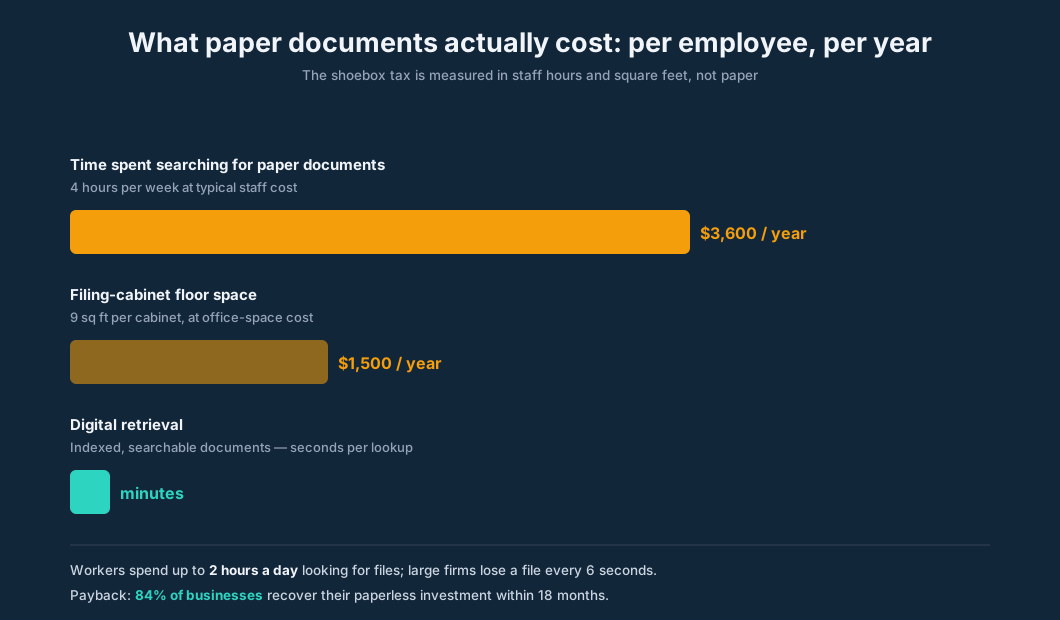
The good news: paperless is one of the fastest-payback investments a firm makes. In one study of businesses going paperless, 28% achieved a full return on their technology investment within six months, another 59% got there in under twelve months, and 84% within eighteen months. The investment is mostly software and changed habits, not capital equipment — so the payback clock starts the week the shoeboxes stop arriving.
How receipt capture actually works
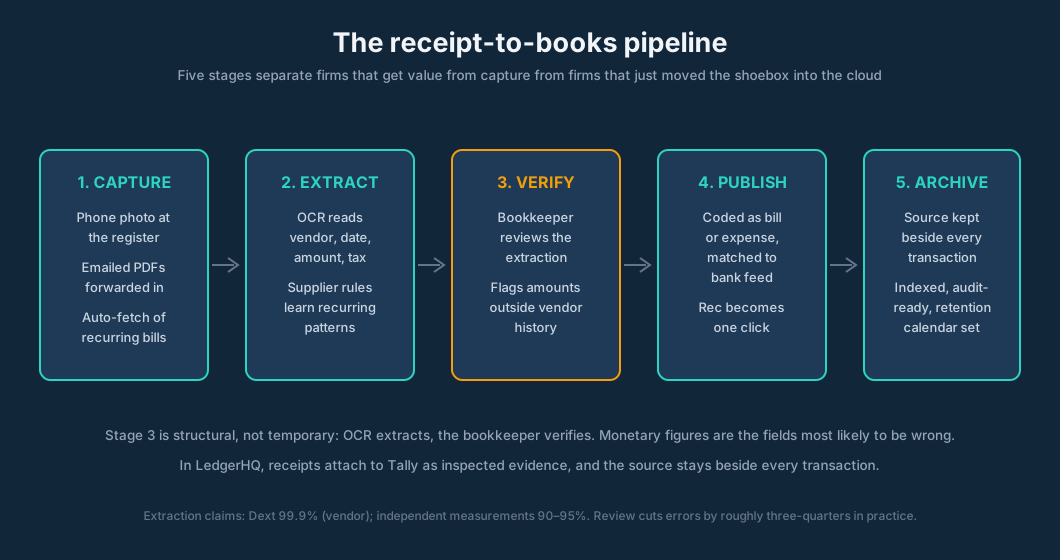
A receipt-capture app does five things in sequence, and understanding each stage is what separates firms that get value from the software from firms that just moved the shoebox into the cloud.
1. Capture. The document enters through a phone photo, an emailed PDF, or an automatic fetch of recurring supplier bills (Hubdoc's signature move — utilities, SaaS, subscriptions pulled without anyone touching them). Capture quality is destiny here: a clean forwarded PDF extracts far better than a crumpled phone photo, and experienced firms make capture behavior part of the client onboarding pack rather than hoping for it.
2. Extraction. OCR reads the document and pulls the fields that matter: vendor, date, subtotal, tax, total, currency, sometimes line items. This is where the marketing numbers live — and where they need context.
3. Verification. Someone — a rules engine, a bookkeeper, or the AI — checks the extraction against known suppliers and amounts. Supplier rules learn: after a couple of weeks, the system codes recurring vendors automatically.
4. Publish and match. The coded document lands in the books as a bill or expense and matches against the bank feed, so reconciliation becomes one click instead of one argument.
5. Archive. The source document stays attached to the transaction, indexed by client, year, and type, on a retention calendar — this is the stage that survives an IRS examination.
What the accuracy numbers honestly say
Vendor claims are loud and specific — Dext claims 99.9% OCR accuracy on UK supplier receipts — while independent comparisons land lower: Dext in the 90–95% range, Hubdoc 85–90%, built-in accounting-app capture 80–85%. The academic literature is sobering in a different way: a 2025 benchmark across thirteen state-of-the-art vision systems found financial fact accuracy ranging from 65.68% to 97.23%, with numerical values and monetary units the most vulnerable fields — errors concentrate in visually complex documents. Independent testers over 90-day periods report the practical truth: one found AutoEntry cut invoice-processing errors from 5–8 a month to 1–2 and weekly data-entry time from 8 hours to 45 minutes; another found Dext cut data-entry errors from 5–8 a week to 1–2 and auto-coded 80% of documents after two weeks of supplier rules.
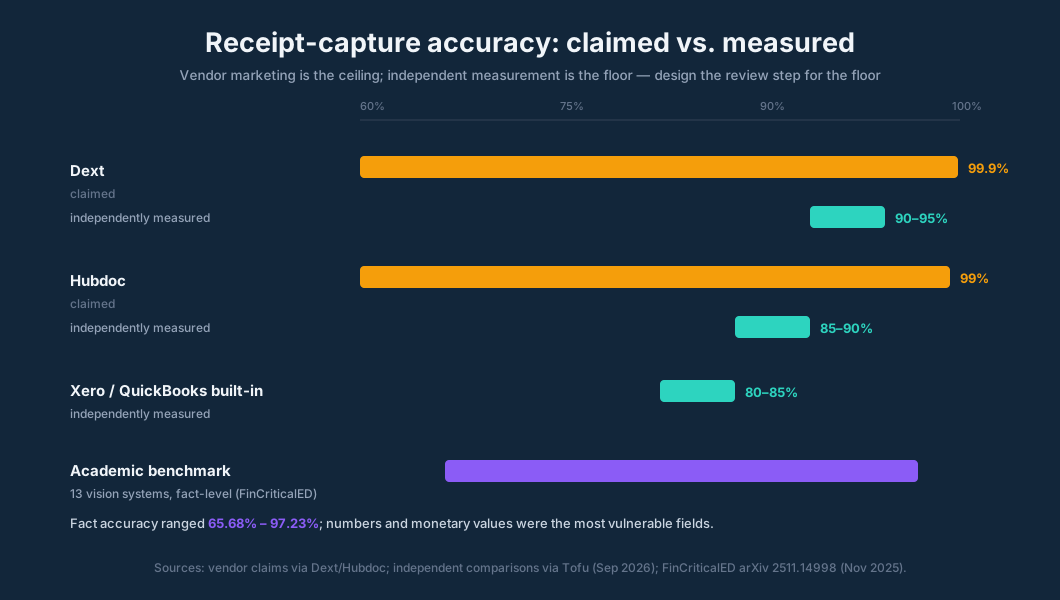
The honest reading: OCR is a powerful data-extraction layer, not a judgment layer. Extraction accuracy depends heavily on document quality, monetary figures are the fields most likely to be wrong, and the review step is structural, not temporary. The firms that do well treat review as a designed checkpoint — the machine extracts, the bookkeeper verifies, the source stays attached.
Worked example: the 40-client firm
Let's price the shoebox for a hypothetical firm with 40 small-business clients, each producing about 200 receipts and bills a month. That's 8,000 documents a month — 96,000 a year.
The manual path. At a conservative 3 minutes of handling per document (collect, open, type, file), the firm spends 400 hours a month — roughly 2.4 full-time equivalents — just moving documents from arrival to the books. At a loaded cost of $28/hour for the staff doing that work, document handling costs the firm about $134,000 a year before a single line of bookkeeping happens.
The capture path. Receipt-capture software runs roughly $20–25 a month per user at the entry tier (Hubdoc is included free with Xero subscriptions in several markets, which changes the math further for those firms). Say the firm pays $2,000 a year in software. Industry announcements put the processing-time reduction above 90% (Dext reported 31.4 million receipts and invoices processed in January 2026, claiming a greater than 90% reduction in processing time versus manual entry). Even at a more cautious 75% reduction, the firm's handling cost drops from $134,000 to about $34,000 — a gross saving of roughly $100,000 against $2,000 in software, leaving 3,000+ recovered staff hours a year that now go to review, advisory, and client work instead of typing.
The numbers vary by firm, but the shape holds: the dominant cost was never the software, it was the labor. And there's a second-order effect practitioners document: one 12-person UK practice cut a bookkeeper's data-entry and receipt-chasing time from about 12 hours a week to about 4 after changing the client onboarding pack — capture app plus bank rules for the 15 highest-volume clients — and the two clients who refused the app got 15% fee increases at renewal to cover the manual handling. That is what pricing the shoebox looks like.
Building the paperless practice: intake to archive
Going paperless is a workflow project, not a software purchase. The firms that succeed build six layers, in order.
1. Intake channels — one for every document type. Paper receipts go through a phone capture app the day they're spent. Emailed invoices and statements forward to a dedicated inbox address. Recurring supplier bills get auto-fetched so nobody ever touches them. Bank statements arrive through the bank feed. The rule: every document type has exactly one door in, and the client knows what it is. Ambiguity is where documents die.
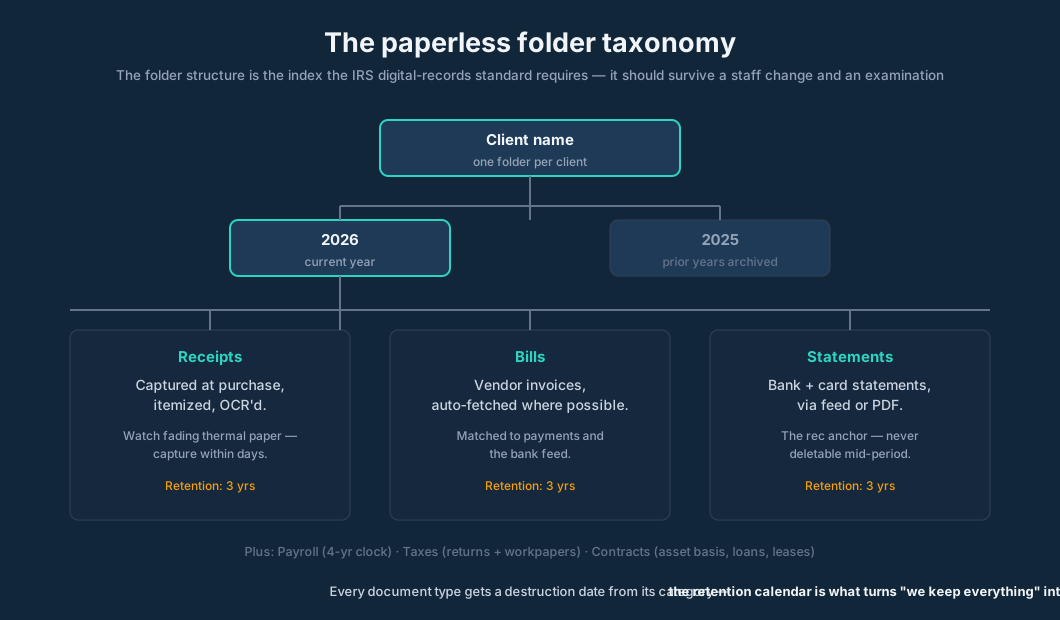
2. Naming and folder taxonomy. The structure should survive a staff change and an IRS examination alike. A proven shape: Client / Year / {Receipts, Bills, Statements, Payroll, Taxes, Contracts} — or its equivalent inside a document hub. The critical discipline: the folder structure is the index the IRS standard requires. A scan in a folder named "misc stuff" fails the "indexed for retrieval" test as surely as a drawer of unsorted paper.
3. The review checkpoint. Extracted documents queue for review the same day or the same week — never in a batch before tax season. The review is fast precisely because the machine did the typing: vendor, amount, date, category, match to the bank line. Flag anomalies — amounts outside the vendor's history, personal-looking vendors, documents that don't match any bank activity — instead of re-typing everything.
4. Retention calendar. Every document type gets a destruction date computed from its category: the 3/6/4-year clocks for tax records, longer where the firm's own policy says so. The calendar is what turns "we keep everything forever in a drive" into a defensible policy — and it is the answer to the auditor who asks how you know the records are complete.
5. The client onboarding pack. The single highest-leverage change most firms can make. New clients get the capture app, the email-in address, the naming rules, and the expectation: documents arrive as they're created, not in a January avalanche. The UK practice that cut its bookkeeper's document time by two-thirds did it with the onboarding pack, not with better software. Clients who won't adopt it pay for the manual handling — that fee increase is the honest price of their choice.
6. Who does what. Clients capture — they hold the phone at the register. The firm's system extracts. The bookkeeper reviews and codes. Tally's AI layer works the follow-ups: Tally asks for statements, documents, and explanations, and when the answer arrives, she uses it and continues the work. The missing-document chase, which historically consumed weeks of firm time every close, becomes a tracked request instead of an email thread.
The document standard that survives an audit
Pull the threads together and you get the examination-ready standard: every transaction has a source; every source is captured at creation; every capture is indexed by client, year, and type; every index entry is retrievable in minutes; every reproduction is legible; nothing can be silently altered. This is not aspirational — it is the digital-records test restated as operations.
Two edge cases deserve explicit handling. First, fading thermal receipts: the ones printed on heat-sensitive paper that go blank in eighteen months. Capture these within days, not quarters — the IRS's legibility requirement does not accept "it was readable when we received it." Second, AI-faked documents: as of 2026, bankers are warning that AI-generated receipts, pay stubs, and forms can appear legitimate on review, and expense-account fraud is a live concern. When a document's metadata, font, or totals look off, verify against the bank record and the vendor — the document is the starting point of evidence, not the end of it.
Where LedgerHQ fits
Be clear-eyed about what each layer of the stack does. The capture app collects. The extraction engine reads. LedgerHQ is where the documents land as working evidence inside the books — and it is worth describing exactly what that means, because it is specific and verifiable.
Receipts and statements can be attached to Tally as evidence she inspects — images, PDFs, spreadsheets, even ZIP packages of statements. The product's own documentation names bank statements, receipts, and bookkeeping documents as the expected evidence you send Tally, and describes an evidence search across the Documents library, accounting attachments, and stored bank statements — so when a statement or receipt already exists, Tally can find it and work from it in the current conversation instead of asking twice.
For documents that need to live somewhere durable, LedgerHQ provides firm and company Files with folders like Taxes, Bookkeeping, Payroll, and Other — upload, preview, move, rename, and delete, with the active company controlling which files the firm member and Tally can see. And the follow-up loop: Tally asks for statements, documents, and explanations. When the answer arrives, she uses it and continues the work. That is the modern version of the month-end chase — tracked inside the workflow, attached to the transaction it explains.
Two honest boundaries. LedgerHQ is not a standalone receipt-capture OCR app — capture happens where the documents already are, and the machine-reading layer lives in the capture tools. And no software, however good, replaces the firm's review judgment: she keeps the source beside every transaction so that when the examiner asks, the answer is one click away, but the bookkeeper's review of the coding is still the bookkeeper's.
LedgerHQ runs $20 per month for each business — the same software and the same price for firms and businesses, with Pro adding the firm workspace. It's currently in Free Preview until January 1, 2027 (start with a card today, pay nothing until then, no contracts, Tally's AI use included).
FAQ
Do I need to keep paper originals after scanning? The IRS accepts digital records that meet its standard — accurate capture of the original, indexed for retrieval, legible reproduction, and tamper controls. Once a document is captured to that standard, the paper original is not required. The risk isn't the law, it's your system: a disorganized drive fails the standard that a well-indexed one passes.
What about receipts that fade? Capture thermal receipts within days. The legibility requirement applies to the reproduction you can produce at examination time, not to what the receipt looked like when printed.
How quickly should documents be reviewed? Same day or same week. The review checkpoint is fast because the machine did the typing; letting extracted documents queue for months recreates the January avalanche the capture app was supposed to eliminate.
Does OCR eliminate data entry errors? It reduces them substantially — independent tests show error rates cut by roughly three-quarters — but it does not eliminate them, especially on visually messy documents. Monetary figures are the most vulnerable field. Review stays.
What happens if a client won't use the capture app? Charge for the manual handling. The practitioner who cut document time by two-thirds used a 15% fee increase for clients who refused the app. The shoebox has a price; the client should see it.
Can I claim expenses with no receipts at all? Mostly no. The Cohan rule lets courts allow reasonable estimates in limited cases, but it does not apply to travel, meals, gifts, or charitable contributions — and you must still show the expense was real. Bank statements can serve as backup documentation for some expenses, but they don't carry business purpose. Capture the receipt; it costs thirty seconds.
Sources
- IRS recordkeeping expectations: burden of proof, record categories, no required format, digital-records standard (accurate capture, indexed retrieval, legible reproduction, tamper controls), retention schedules. — cocountant.com, updated ~September 2026. https://cocountant.com/blog/bookkeeping/what-the-irs-expects-from-your-financial-records-and-how-to-stay-compliant/
- The $75 receipt exemption under IRS Publication 463; records of amount, date, place, and nature still required. — Accounting Insights, January 27, 2025. https://accountinginsights.org/irs-receipt-requirements-for-expenses-under-75/
- Receipt requirements for 2026: mandatory receipts for travel, meals, vehicle, and expenses of $75+; itemized vs. summary receipts; valid-receipt elements. — myEagleCountry, 2026. https://lifestyle.myeaglecountry.com/story/133209/irs-receipt-requirements-for-business-expenses-in-2026/
- The Cohan rule and its limits (Cohan v. Commissioner, 39 F.2d 540; exclusions for travel, meals, gifts, charitable contributions). — TMD Accounting. https://tmdaccounting.com/what-if-i-get-an-irs-tax-audit-and-i-have-no-receipts/
- Paper-document costs: 4 hrs/week searching ($3,600/employee/year), filing cabinet $1,500/year, ROI timing. — TechBullion. https://techbullion.com/paperless-office-solutions-modern-tools-for-document-management/
- Paperless ROI: 28% of businesses full return within 6 months, 59% under 12, 84% within 18. — CEO Today Magazine, September 2022. https://www.ceotodaymagazine.com/2022/09/the-business-benefits-of-going-completely-paperless-explained/
- EPA: 10,000+ sheets/year per knowledge worker; PwC: document labor up to $3.5M/year at 1,000 employees. — Intelligent SME.tech, June 2021. https://www.intelligentsme.tech/2021/06/17/why-the-paperless-office-is-more-important-than-ever-before/
- Lost files: one every 6 seconds at large organizations; up to 2 hrs/day spent looking for files. — STP Texas. https://www.stptexas.com/blog/4-reasons-your-office-should-go-paperless
- OCR accuracy: Dext 99.9% vendor claim (UK); independent comparisons (Dext 90–95%, Hubdoc 85–90%, built-in 80–85%). — Tofu blog, September 2026. https://www.gotofu.com/blog/ocr-bookkeeping
- FinCriticalED: 13 vision systems, financial fact accuracy 65.68%–97.23%, numbers and monetary units most vulnerable. — arXiv 2511.14998, November 2025.
- Financial Cents "2026 State of AI in Accounting and Bookkeeping": 486 professionals, 38% of AI-active firms use document/receipt extraction OCR; barriers accuracy/trust (26%), data security (22%). — Financial Cents, September 2026. https://financial-cents.com/resources/guides/the-state-of-ai-in-bookkeeping-accounting/
- Dext: 31.4M receipts/invoices processed in January 2026; claimed >90% processing-time reduction vs. 3–4 min manual per document. — techbusinessnews.com.au, March 2026. https://www.techbusinessnews.com.au/news/dext-launches-smart-ai-to-streamline-everyday-book-keeping-decisions/
- Independent 90-day tests: AutoEntry errors 5–8/month → 1–2/month, entry time 8 hrs → 45 min/week; Dext errors 5–8/week → 1–2/week, 80% auto-coded after two weeks. — fahimai.com reviews, February 2026.
- Hubdoc: free with Xero (UK/CA/AU/NZ), auto-fetch of recurring supplier bills. — ThriveonZ360, 2026. https://thriveonz360.com/best-receipt-expense-management-software-2026-dext-vs-expensify-vs-hubdoc/
- Practitioner case: 12-person practice, 12 hrs/week → 4 hrs/week via onboarding pack; 15% fee increase for clients refusing the app. — Lilach Bullock, September 2026. https://www.lilachbullock.com/ai-tools-for-accountants-automate-bookkeeping/
- AI-generated receipts/pay stubs appearing legitimate on review; expense-account fraud concerns. — National Mortgage News, July 2026.
- LedgerHQ product facts: Tally evidence attachments (images, PDFs, spreadsheets, ZIPs), receipts as expected evidence, Documents-library evidence search, firm/company Files. — LedgerHQ Docs, fetched October 2026. https://ledgerhq.pro/docs/help/tally-evidence-attachments
- LedgerHQ marketing copy: "Tally asks for statements, documents, and explanations"; "keeps the source beside every transaction"; $20/month per business; Free Preview until January 1, 2027. — ledgerhq.ai, verified September 2026.