
Firm operations
What Is AI Bank Reconciliation, Really?
A deep, evidence-backed guide to how AI bank reconciliation actually works — the six-stage workflow, a worked example with real numbers that tie out, honest time comparisons, the human control framework, failure modes, and a firm implementation checklist.


The short answer
AI bank reconciliation is software that reads your client's bank statement, matches every line on it to the transactions already in the books, flags only the ones it cannot confidently match, and refuses to close the period until the difference is exactly zero. The human's job moves from typing and ticking to reviewing exceptions and signing off.
What it is not: a robot that posts whatever it wants to the ledger. Every confident match stays visible, every exception still needs a human decision, and nothing locks until the books and the bank agree to the penny. If a vendor tells you their AI "just handles it," ask them where the human reviews the exceptions. That question is the entire evaluation.
Why this matters now
Bank reconciliation is the oldest control in bookkeeping and still one of the most expensive to perform by hand. Hubdoc's "Hours to Minutes" guide — written for firms still doing this manually — uses 1.5 to 2.5 hours per client per week as its example of what manual document-chasing and reconciliation cost a firm. Take the midpoint of that example, 2 hours, multiply it by 40 clients, and you get 80 hours a week: two full-time people doing nothing but reconciliations. That is the math that is breaking small firms, and it is the math AI reconciliation attacks directly.
The profession is already moving. A 2026 Blue J / CPA.com survey of more than 1,000 tax professionals found that 60% use AI-powered tax research at least weekly and 84% say AI saves them time. More telling is what they do with the time: 50% reinvest it in client response and delivery, 47% in staff work-life balance, and 46% in higher-quality advice. And 69% anticipate value-based, hybrid, or fixed-fee billing — the pricing model that only works when your cost per client stops scaling linearly with hours. AI reconciliation is one of the clearest places that leverage shows up first, because the work is high-volume, rules-based, and brutally repetitive: exactly what machines are for.
How it actually works: the six stages
Strip away the marketing and every AI reconciliation product does the same six things in the same order. Understand these and you can evaluate any vendor in fifteen minutes.
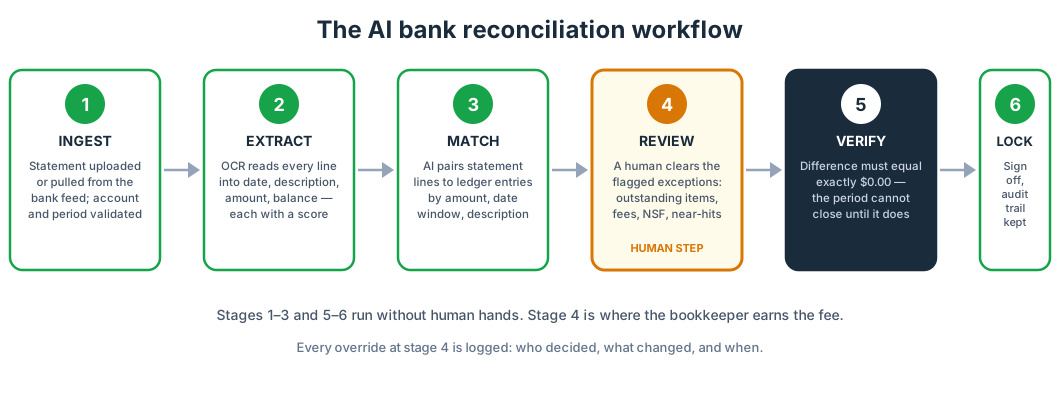
Stage 1 — Ingestion
The statement arrives one of two ways: somebody uploads the PDF, or the system pulls it straight from the bank feed. Before anything else happens, the software validates that it has the right account and the right period. This sounds trivial until you have seen a firm reconcile the operating account against the payroll account's statement for forty-five minutes. Catching the wrong statement at ingestion is a real control, and it is one of the cheapest wins in the whole pipeline.
Stage 2 — Extraction (OCR)
Every line on the statement becomes structured data: date, description, amount, running balance. On clean, machine-printed PDFs, modern OCR is highly accurate. The errors concentrate where you would expect: scanned images of paper statements, faint dot-matrix print, descriptions that wrap across two lines, and amounts where a "1" looks like a "7." Each extracted field carries a confidence score, and anything below the threshold gets flagged for human eyes rather than guessed at. That last part matters more than the accuracy rate: a system that guesses wrong silently is worse than a slower system that asks.
Stage 3 — Normalization
"CHK 2041," "CHECK #2041," and "Ck2041" are the same check. Statement dates arrive in half a dozen formats. Amounts get converted to integer cents — never floating point, because this is exactly where rounding bugs are born. This stage also catches duplicate lines caused by overlapping statement periods, which is one of the most common sources of phantom differences. Normalization is invisible when it works and it is the reason matching works at all.
Stage 4 — Matching
The engine compares each statement line against the ledger on three axes: amount, date within a tolerance window (typically three to five days either side), and description similarity. Exact matches on all three clear automatically. Near matches — right amount, date off by two days, description close — get proposed with a confidence score attached. Anything below the threshold becomes an exception.
Most products let you accept a batch of high-confidence matches with one click. That click is fine, but "high confidence" is a setting, and your firm should set it, not the vendor. A 95% threshold and an 80% threshold produce very different exception queues, and the right number depends on how clean your clients' books are going in.
Stage 5 — Exception review (the human step)
This is the work now. Everything the machine could not confidently resolve lands in a queue, and a human works it: outstanding checks, deposits in transit, bank fees the books never saw, NSF items, duplicate entries, and near-matches that need judgment. Each exception arrives with a proposed resolution — accept it, edit it, or reject it. In a typical small-business month, this queue is a dozen items, not two hundred. The bookkeeper's expertise concentrates here, on the items that actually require expertise, instead of being spread thin across two hundred lines of ticking.
Stage 6 — Verification and lock
The system computes the difference: adjusted book balance versus adjusted bank balance. If it is not exactly $0.00, the period cannot close — full stop. When it is zero, the reviewer signs off, the session locks, and the audit trail records everything: who matched what, who overrode which suggestion, when each decision happened. That trail is not a nice-to-have. It is what makes the whole thing defensible when a client, a lender, or an auditor asks how a number got there.
A worked example: Bluebird Coffee Roasters, September 2026
Theory is cheap. Here is a full month-end reconciliation with real numbers that tie out. This is an illustrative example — a fictional company — built to show exactly what each side of the reconciliation looks like and what the AI handles versus what the human handles.
The bank statement (First National, operating account):
| Amount | |
|---|---|
| Beginning balance, September 1 | $40,000.00 |
| Deposits and credits | $36,000.00 |
| Withdrawals and debits | ($31,500.00) |
| Ending balance, September 30 | $44,500.00 |
The deposit detail: customer deposits of $35,400.00 plus a $600.00 note the bank collected on the company's behalf. The withdrawal detail: checks paid of $22,000.00, ACH and EFT payments of $9,405.00, and bank service charges of $95.00. Arithmetic check: $40,000.00 + $36,000.00 − $31,500.00 = $44,500.00.
The books (cash account) at September 30, before adjustments: $41,115.00
The books do not know about the bank's fees yet. They do not know a customer's $420.00 check bounced. They do not know the bank collected that $600.00 note. The reconciliation is the process of surfacing exactly those gaps.
Book side adjustments:
| Amount | |
|---|---|
| Book balance, September 30 | $41,115.00 |
| Less: bank service charges not yet in books | ($95.00) |
| Less: NSF check (customer) | ($420.00) |
| Add: note collected by bank, not yet in books | $600.00 |
| Adjusted book balance | $41,200.00 |
Check: $41,115.00 − $95.00 − $420.00 + $600.00 = $41,200.00.
Bank side adjustments:
| Amount | |
|---|---|
| Statement ending balance | $44,500.00 |
| Add: deposit in transit (Sep 30 card settlement, posted Oct 1) | $3,600.00 |
| Less: outstanding checks (#2041: $2,400.00; #2044: $2,800.00; #2047: $1,700.00) | ($6,900.00) |
| Adjusted bank balance | $41,200.00 |
Check: $44,500.00 + $3,600.00 − $6,900.00 = $41,200.00. Outstanding checks: $2,400.00 + $2,800.00 + $1,700.00 = $6,900.00.
Difference: $41,200.00 − $41,200.00 = $0.00. Clean close.
What the AI did versus what the human did
The statement had 214 lines. The AI extracted all 214, auto-matched 201 of them to ledger transactions, and flagged 13 exceptions: the 3 outstanding checks, the deposit in transit, the $95.00 fee, the $420.00 NSF, the $600.00 note collection, and 6 near-matches where descriptions were close but not exact. The human reviewed 13 items, accepted 11 proposed resolutions as-is, and edited 2. Hands-on time: about 12 minutes. The manual version of this same month — printing the statement, ticking 214 lines against the ledger, hand-keying the adjusting entries — is a 90-minute job on a good day.
Notice what the human actually did: exercised judgment on 13 items. Nobody with a CPA license should spend 78 minutes ticking lines a machine can tick. That is the entire economic argument in one paragraph.
Manual versus AI-assisted: honest numbers
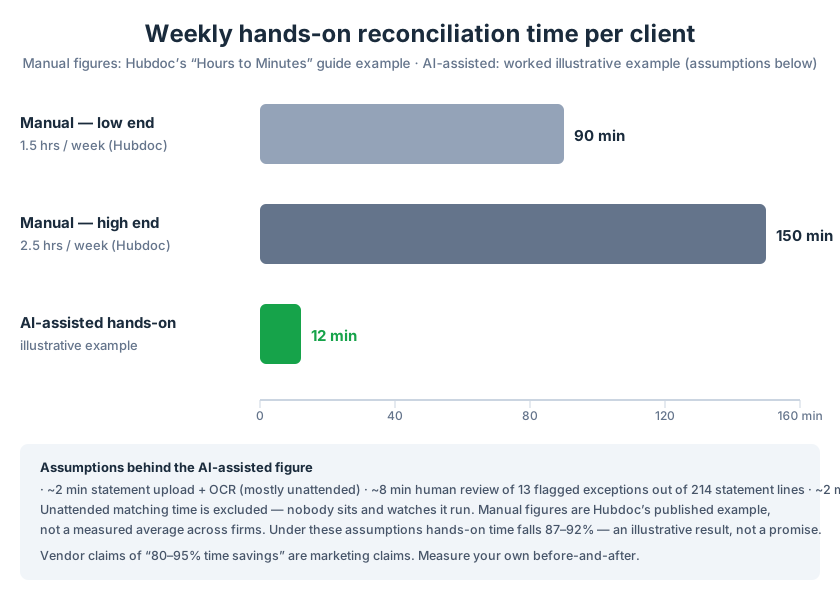
The manual column comes from Hubdoc's published example: 1.5 to 2.5 hours per client per week for the manual document-and-reconciliation workflow. The AI-assisted column is a worked illustrative example with stated assumptions: roughly 2 minutes for statement upload and OCR (mostly unattended), roughly 8 minutes of human review over a dozen-odd flagged exceptions, roughly 2 minutes to verify the zero difference and close. Unattended matching time is excluded because nobody sits and watches it run.
Under those assumptions, hands-on time falls from 90–150 minutes to about 12 minutes — an 87–92% reduction in this example. Read that sentence again: in this example, with these assumptions. Your clients' transaction volumes, your exception rates, and your reviewers' speed will differ. Measure your own before-and-after for four weeks before you quote a number to anyone.
A note on vendor claims: you will see "80–95% time savings" on vendor websites. Those are vendor marketing claims, not independently verified facts. The math above is my own worked example with every assumption on the table, which is the only kind of savings number you should trust — yours.
What it means at firm scale (illustrative)
Take a 40-client firm at the midpoint of Hubdoc's example — 2 hours per client per week. That is 80 hours a week of reconciliation labor: two full-time people. At 12 minutes of hands-on time per client per week, the same workload is 8 hours: one person, one day. The freed 72 hours do not vanish; per the Blue J / CPA.com survey, firms redeploy that time into client response, staff sanity, and better advice — the inputs to the value-based pricing 69% of respondents see coming. This is an illustration with stated assumptions, not a promise. But the direction is not in doubt, only the magnitude.
What the profession is actually doing with AI
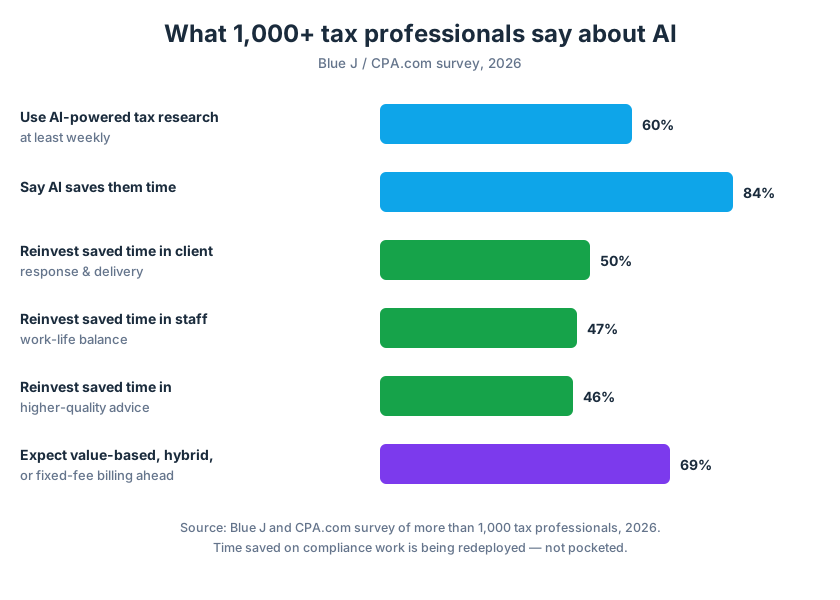
The Blue J / CPA.com numbers deserve a closer read, because they describe where the profession's head is:
- 60% use AI-powered tax research at least weekly. AI is not a pilot project anymore; it is a weekly habit for the majority.
- 84% say AI saves them time. The time dividend is real and widely felt.
- 50% reinvest it in client response and delivery, 47% in staff work-life balance, 46% in higher-quality advice. Notice what is not on the list: layoffs. Firms are spending the dividend on service quality and retention.
- 69% anticipate value-based, hybrid, or fixed-fee billing. This is the tell. You only price on value when your cost to deliver stops being a straight function of hours. AI reconciliation is one of the mechanisms that makes that pricing possible: the per-client cost collapses, so the per-client price can be set by value instead of by timesheet.
The human-review and control framework
AI reconciliation without controls is just faster chaos. Here is the framework that makes it defensible.
1. The $0.00 gate is non-negotiable. The period cannot close with a nonzero difference. Not "close enough," not "immaterial" — zero. This is the single most important control in the system, and it should be enforced by software, not by policy. If your tool lets a reviewer override a nonzero difference and close anyway, that is a defect in the tool.
2. Maker-checker on exceptions. The person who runs the matching should not be the person who signs off on the exceptions — in any firm large enough to separate the roles. In a solo practice, the owner reviews the exception log before close. Either way, two sets of eyes touch every judgment call: the AI proposes, a human disposes, and a second human (or the owner) approves.
3. Every override is logged. Who accepted which proposed match, who edited a resolution, who cleared each exception, and when. The audit trail is the difference between "the AI did it" and "here is exactly what happened, line by line." When a lender asks about a number six months later, this log is your answer.
4. Confidence thresholds are set by the firm. The vendor's default auto-match threshold is a starting point, not a policy. Set it deliberately: higher for messy clients with dirty descriptions, and review what the machine cleared at each threshold for the first month. The threshold is a risk decision disguised as a settings toggle.
5. Segregation where it counts. The person who configures bank feed mappings and match rules should not be the person who approves the reconciliation. This is the same segregation principle as the paper world, applied to the new choke points.
6. Plugs require a category and a reviewer. Sometimes a small difference needs a manual adjusting entry to clear. That entry must hit a visible plug account, carry a memo explaining it, and appear in the reviewer's queue — never buried. A plug account that nobody reviews is where errors go to hide.
Failure modes and edge cases
Every system fails. The question is whether it fails loudly or quietly. Know these:
Duplicate ingestion. The same statement gets uploaded twice, or the bank feed and a manual upload overlap. The result is doubled transactions and a difference that will not resolve. The defense: ingestion fingerprints — the system should refuse to ingest a statement period it has already processed, and flag exact-duplicate transaction pairs.
Stale feeds. The bank feed stops syncing — credentials expire, the bank changes its login flow — and the balance looks fine but is six days old. Reconciling against stale data produces a clean-looking close against wrong numbers. The defense: every feed displays its last successful sync timestamp, and anything older than 48 hours blocks auto-matching until refreshed.
OCR misreads. A "1" becomes a "7," a decimal point vanishes on a scanned statement, a two-line description gets split into two transactions. The defense is the confidence score from Stage 2: low-confidence extractions go to the human queue, never to auto-match. Faint or scanned statements should default to human review of every line above a materiality threshold you set.
Timing differences versus real errors. Outstanding checks and deposits in transit are legitimate timing differences; a missing $4,200 wire is not. The failure mode is treating all unmatched items the same. The defense: the system should age unmatched items — anything outstanding more than 30 days gets escalated, because at that point it is probably not timing anymore.
Fraud signals. Duplicate check numbers, round-dollar payments to brand-new vendors, checks clearing out of sequence, a sudden change in a vendor's payment pattern. AI matching can surface these as anomalies if the firm configures it to look. This is an underused capability: the same engine that matches transactions can flag the ones that do not fit the client's history. Treat anomaly flags as a bonus control, not a fraud guarantee.
The force-to-zero temptation. The $0.00 gate prevents closing with a difference, but a rushed reviewer can still post a bogus plug to make the difference vanish. No software prevents a determined human from lying; the control is cultural and procedural — plugs are categorized, visible, and reviewed, per the framework above.
Implementation checklist for firms
Do not roll this out to forty clients on day one. Here is the sequence that works:
- Pick one client, one account. Choose a clean, cooperative client with a single operating account and a normal transaction volume. You are calibrating, not scaling.
- Set your confidence thresholds before going live. Write down the auto-match threshold and the review threshold, and why you chose them.
- Define the roles. Name who runs the matching, who reviews exceptions, and who signs off. In a solo firm, that is "me, me, and me, in that order" — still write it down.
- Run parallel for one month. Do the reconciliation the old way and the new way. Compare the exception queues and the final numbers line by line. This is your calibration data.
- Hand-verify the first three closes. Every auto-matched transaction in the first three periods gets a human glance. You are training your trust in the thresholds, and trust should be earned with evidence.
- Document your exception categories. Outstanding checks, deposits in transit, fees, NSF, duplicates, near-matches, anomalies. When a new staff member asks "what do I do with this," the answer should already exist.
- Lock prior periods. Once a period closes clean, it stays closed. Adjustments to locked periods go through a formal reopen process with a reason code, not a quiet edit.
- Train on the failure modes. Walk the team through duplicates, stale feeds, OCR misreads, and the force-to-zero temptation before they encounter them live.
- Review the audit trail monthly. Spot-check who overrode what. Patterns here — one staffer overriding constantly, one client generating all the exceptions — are management information.
- Measure for four weeks, then decide. Track hands-on minutes per client per week, before and after. That measurement, not a vendor's brochure, is the number you use to plan capacity and pricing.
Frequently asked questions
What is AI bank reconciliation?
Software that reads a bank statement, matches each line to the transactions in the books, flags the exceptions it cannot confidently resolve, and blocks the period from closing until the difference is exactly zero. The human reviews exceptions and signs off; the machine does the ticking.
Does AI bank reconciliation replace the bookkeeper?
No. It replaces the ticking, not the judgment. The bookkeeper's work concentrates on the exceptions — the dozen items per month that actually require expertise — plus the review, the sign-off, and the client relationship. Firms using it redeploy the saved time into client service and advisory work, not headcount reduction.
How accurate is bank statement OCR?
On clean, machine-printed PDF statements, modern OCR is highly accurate. Accuracy drops on scanned images, faint print, and multi-line descriptions. The right question is not the accuracy rate but what happens to low-confidence extractions: they should go to a human queue, never be silently guessed.
What happens when the AI cannot match a transaction?
It becomes an exception with a proposed resolution. A human accepts, edits, or rejects the proposal. Common exceptions: outstanding checks, deposits in transit, bank fees, NSF items, duplicates, and near-matches on descriptions.
Can the period close if the difference is not zero?
In a properly built system, no. The $0.00 gate is the core control: adjusted book balance must equal adjusted bank balance to the penny before close. Any tool that lets a reviewer override a nonzero difference and close anyway has a control defect.
How long does AI-assisted reconciliation take per client?
It depends on transaction volume and exception rates. As a worked illustrative example: roughly 2 minutes for upload and OCR, 8 minutes of human exception review, and 2 minutes to verify and close — about 12 minutes of hands-on time per client per week, versus 1.5 to 2.5 hours manually (Hubdoc's example). Measure your own before quoting numbers.
Is my client's bank data safe?
Bank data should be encrypted in transit and at rest, accessed via read-only credentials or official bank feeds, and never stored longer than necessary. Ask your vendor: who can see the data, where it is stored, and what happens to it if you cancel. "Trust us" is not an answer.
What should I look for when evaluating vendors?
Four things: where the human reviews exceptions (the workflow above), whether the $0.00 gate is enforced by software, whether every override is logged with who and when, and whether you — not the vendor — control the auto-match confidence thresholds. If a demo cannot show you all four, keep looking.
Sources
- Hubdoc, "Hours to Minutes" guide — the 1.5–2.5 hours per client per week manual-workflow example: http://go.hubdoc.com/hubfs/Hours-to-Minutes/Hours-to-Minutes-Guide.pdf
- Blue J / CPA.com 2026 survey of 1,000+ tax professionals (60% weekly AI tax research use; 84% say AI saves time; 50%/47%/46% reinvestment figures; 69% anticipate value-based/hybrid/fixed-fee billing): https://cw7az.com/business/press-releases/ein-presswire/917662513/blue-j-and-cpa-com-survey-finds-ai-adoption-among-tax-firms-has-nearly-doubled-in-one-year/
- The worked reconciliation example (Bluebird Coffee Roasters) is fictional and illustrative; all figures tie out arithmetically as shown.