Bank reconciliation
Reconcile bank and credit card accounts from statement ending balances.
Start With The Automated Path
Most periods never need the manual sequence. Let Tally reconcile from statements covers the normal case: a verified statement plus posted activity, and Tally builds the worksheet, matches the rows, and finishes the period.
The sequence below is what you use when Tally hands a period back, when an account is being set up for the first time, or when no statement evidence exists.
Follow The Reconciliation Sequence
- Prepare for your first reconciliation.
- Start a bank reconciliation.
- For a card or loan, enter liability balances correctly.
- If the difference is not zero, investigate the difference.
- Finish the reconciliation.
LedgerHQ does not require statement PDFs to be attached to the reconciliation screen. Statement PDFs live in Statements when Plaid provides them, but the rec workflow itself is driven by the statement ending balance and cleared transactions. This keeps reconciliation usable even when the statement comes from a PDF, a bank website, or a client-provided document outside LedgerHQ.
Prepare And Start A Reconciliation
Open Bank Recs and choose the account you want to reconcile. For the first reconciliation on an account, LedgerHQ asks for a starting balance, statement end date, and statement ending balance. For later reconciliations, LedgerHQ uses the ending balance from the prior completed reconciliation as the next starting balance.
This prior-balance carry-forward is important. It means a normal monthly rec does not need the user to re-enter the beginning balance each time. If the starting point looks wrong, review the previous completed reconciliation before continuing.
For imported or fresh-start books, the first reconciliation can establish a baseline while identifying checks, deposits, or other outstanding items that must remain uncleared. Those items carry forward into the next reconciliation instead of being forced into the baseline. Confirm the baseline date, balance, and every carried item before accepting the starting point.
Agent-facing and Tally-assisted workflows can use a preparation step before starting the session. Preparation checks the account, period, prior balance, statement balance convention, and likely transaction set before any reconciliation session is changed. This is especially important for credit card, loan, and other liability-style registers.
For liability accounts, enter the positive balance-due amount shown on the
statement in the web form. LedgerHQ converts it to the negative signed balance
used by the liability register. If a statement says the card balance due is
$1,200, enter 1200.00 in the reconciliation form.
Clear Statement Transactions
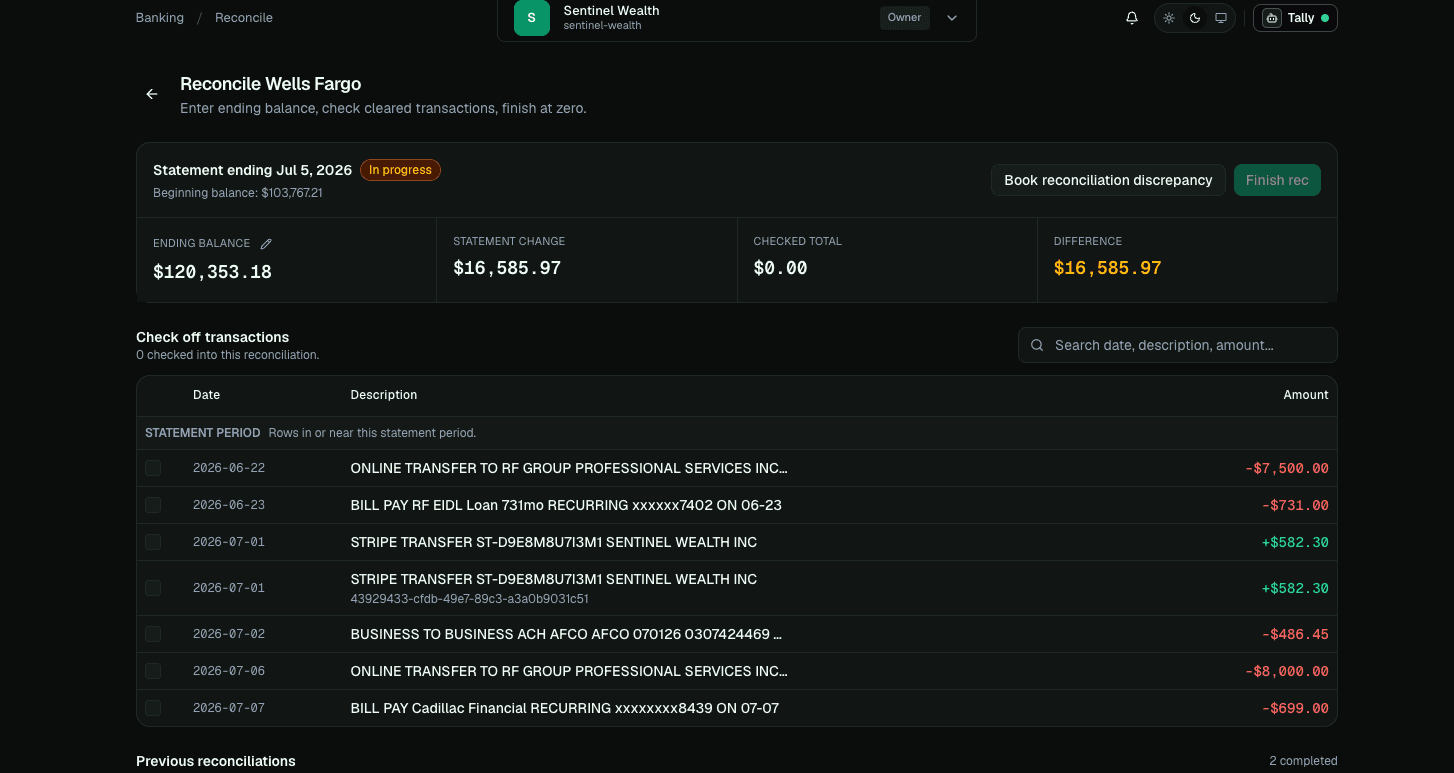
Inside the reconciliation session, check the transactions that appear on the statement. The goal is not to check every transaction in the register. The goal is to check the transactions that cleared the bank by the statement end date.
If a transaction is missing, it may not have been posted yet, it may still be a pending bank feed row, or it may have been coded to a different register. Use Bank Feeds, Journal Entries, or Tally's search before forcing the reconciliation to balance.
In-progress setup can be edited when the statement date, balance, or starting balance was entered incorrectly. A mistaken in-progress session can also be cancelled. Cancelling is better than forcing a session forward with bad setup values.
Completed reconciliations are normally historical records. If a completed rec was built from incorrect setup or clearing evidence, use the controlled repair path or contact support rather than editing register history until the old rec appears to balance.
Finish At Zero Difference
The reconciliation is ready to finish when the difference is zero. At that point, LedgerHQ stores a completed reconciliation snapshot with the balances, cleared rows, discrepancy entries if any, and finish metadata.
Completed snapshots matter because they give the firm a record of what was cleared at the time the reconciliation was finished. If a later user asks why a transaction was part of a prior rec, Tally and support can inspect the reconciliation context instead of relying on memory.
Reconciliation sessions may carry optional statement evidence snapshots for agent or Tally handoff. The rec workflow is still driven by the statement end date, ending balance, and cleared posted rows. Statement PDFs and coverage live in the Statements workflow.
If statement evidence exists, the reconciliation can be worked. A nonzero difference does not mean the rec is not ready; it means the rec does not balance yet and the team should look for missing transactions, timing differences, or an accepted discrepancy entry.
Use Reconciliation Entry Carefully
If the reconciliation does not balance, LedgerHQ can create a Reconciliation Entry. This books a real posted journal entry dated to the statement end date, offsetting the bank or credit card account to a P&L account named Reconciliation Entry. It also attaches a reconciled bank transaction to the same session so the rec can finish.
Use this only when the firm intentionally accepts the difference. It is useful for small immaterial differences or cleanup situations where the user has decided not to keep searching. It should not be the first response to a large unexplained variance.
A Reconciliation Entry is a real accounting entry. It makes the rec balance, but it does not explain the underlying cause. For large differences, missing bank feed rows, duplicate transactions, or unclear timing issues, investigate before creating the entry.
Tally-Assisted Reconciliation
Tally can detect statement-backed reconciliation periods when statement coverage exists, the statement maps to an active bank or card register, no completed reconciliation already covers the same statement end date, and no active unposted in-period feed rows need posting first. Excluded bank-feed rows are not normal reconciliation evidence and should stay out of matching or duplicate analysis unless a user explicitly asks for excluded-history diagnostics.
In watch-and-suggest mode, Tally can prepare a session and stage a one-click finish worksheet. In autonomous mode, Tally can finish only zero-difference or materiality-safe reconciliations when authority and validation allow it. Unknown differences, sign-inversion evidence, or large unexplained variances should escalate for human review.
Let Tally reconcile from statements
When the statement is verified and the period's activity is posted, Tally builds the worksheet, matches the rows, and finishes the reconciliation for you.
Prepare for your first reconciliation
Make sure the statement, register, and starting point are ready before you begin a bank reconciliation.