Create a company and add owners
Create company books, choose the starting chart, manage equal owner access, and maintain Company info.
Create The Company
For the first-company procedure, use Create your first company. If the starting path is not settled, first read Choose how to start or move a company.
Open Companies and select New company. Enter:
- the exact company name;
- a URL slug using lowercase letters, numbers, and hyphens;
- the first owner's name, email, and cell phone;
- a chart starting choice (see below).
Start fresh creates LedgerHQ's standard chart so bookkeeping can begin.
Import from QuickBooks starts with an empty chart. On LedgerHQ + Tally firms, create then opens Tally so the firm can drop the QuickBooks Chart of Accounts CSV and Journal report CSV; Tally previews before anything posts. On Core firms, create opens Settings > Import & Export for the same file pair.
Build from bank CSVs (LedgerHQ + Tally only) creates a standard chart and opens Tally Back work so the firm can drop bank and card transaction exports. Tally builds historical books from that evidence.
Settings > Import & Export remains available anytime for a manual QuickBooks run or exports. Create Company is the guided front door for new companies.
The firm's Billing choice applies automatically. Core firms create Core companies; Tally firms create Tally companies. There is no company package switch during creation.
Owner Access Is Equal
Company owners have equal client access. The first owner receives the company invitation or welcome email after creation. Add another owner from Company info when another person should have the same portal access.
There is no primary owner for access. A separate outreach selection can choose which owner receives bank-connection texts, but that choice does not change ownership or permissions.
Keep each owner's name, email, and cell phone current in Company info. This is the shared contact source used by client access, requests, Tally, bank connection texts, and other company communications. Do not maintain a second copy of the same contact on the Bank Feeds page.
Use Company Info
From the Companies list, select Company info. The owner section manages active owners and pending invitations. Use it to add, correct, resend, or remove access as the firm's relationship changes.
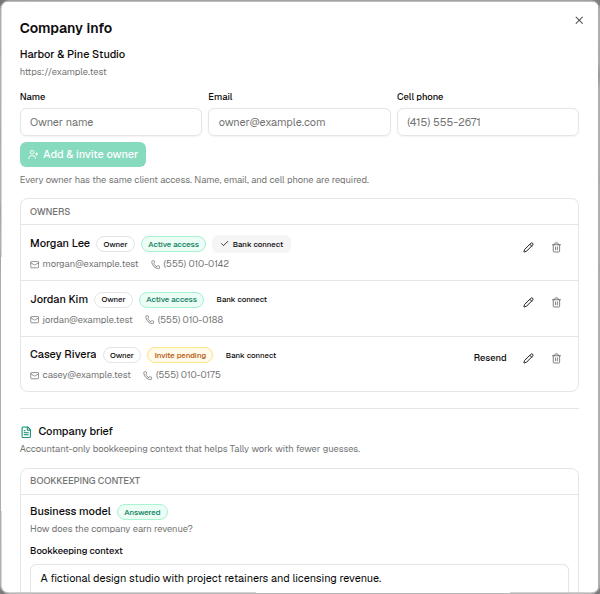
The same dialog contains the accountant-only company brief. The brief records operating facts Tally should understand, such as the business model, important accounts, recurring patterns, communication preferences, and other company context. Company owners do not see this internal brief.
Tally can help conduct the standard company interview and prepare descriptive Company info updates. A person must confirm those updates before Tally saves them. The brief cannot be used to change billing, integrations, currency, permissions, or Tally authority.
Choose The Bank Outreach Owner
Open Bank Feeds and then Company texts when one owner should receive new-bank or reconnect requests. Select an owner whose cell phone is complete. The selection controls bank outreach only; all company owners remain equal.
For the full texting workflow, see Bank connection texts.
Use the company owner's real email address. Request replies, secure links, welcome messages, and client access depend on a stable owner identity.
Archive Instead Of Deleting Books
Archive a company when the firm needs to stop active work while preserving its books. Archival removes the company from normal active work and pauses related connections without pretending its history never existed. Restoring the company returns that preserved record to active use.
An archived company is preserved but leaves active work and firm billing. Restoring it returns it to active work and the firm's billed company count. There is no separate billing-disabled company state.