Bank rules and auto-posting
Understand rule coding, rule auto-posting, and firm-confidence AI posting in bank feeds.
Create Rules For Repeating Patterns
A rule is a user-defined match that always codes the same way. An AI suggestion is a researched guess for rows with no matching rule. Only posting turns a row into ledger activity.
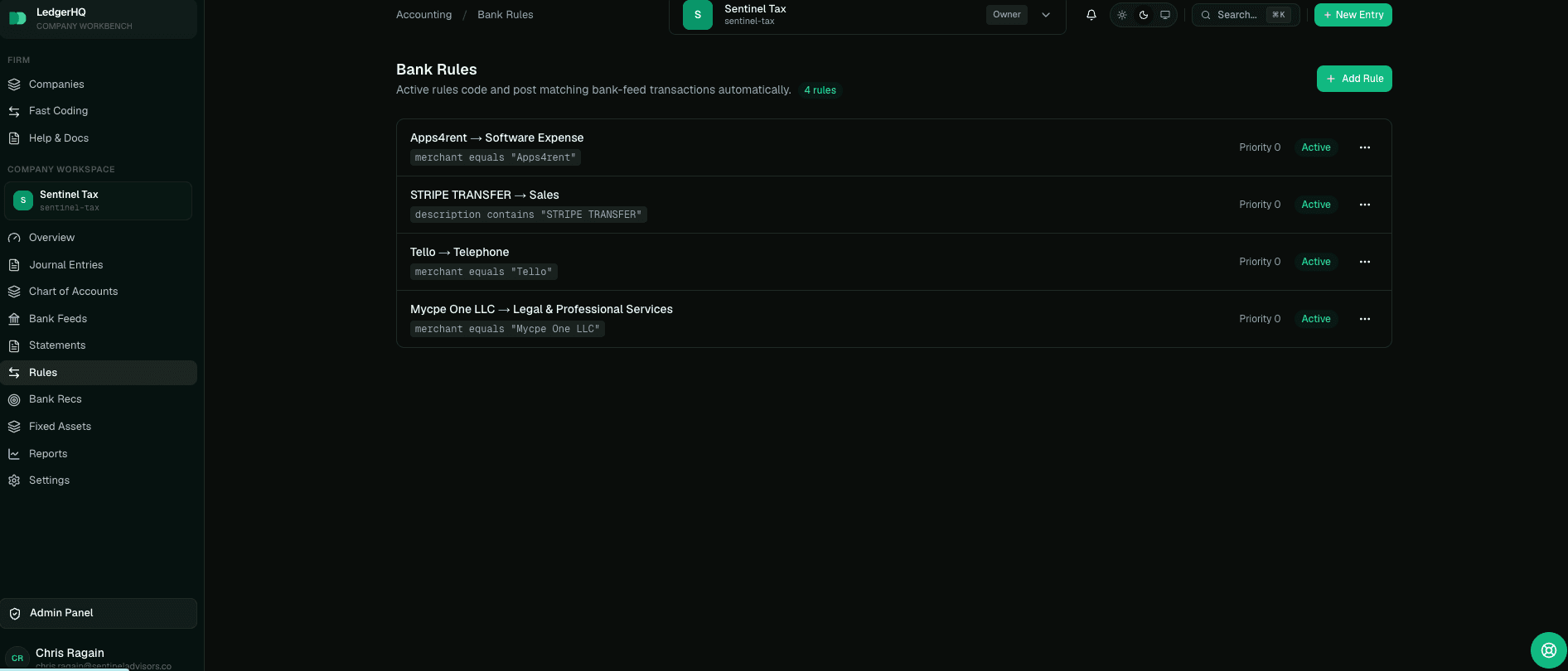
Open Rules from the company workspace when you want LedgerHQ to recognize a repeat pattern. A rule has a name, a priority, a match field, a match type, a match value, and an accounting account. The match field can be description, reference, or merchant/payee. The match type can be contains, equals, starts with, or ends with.
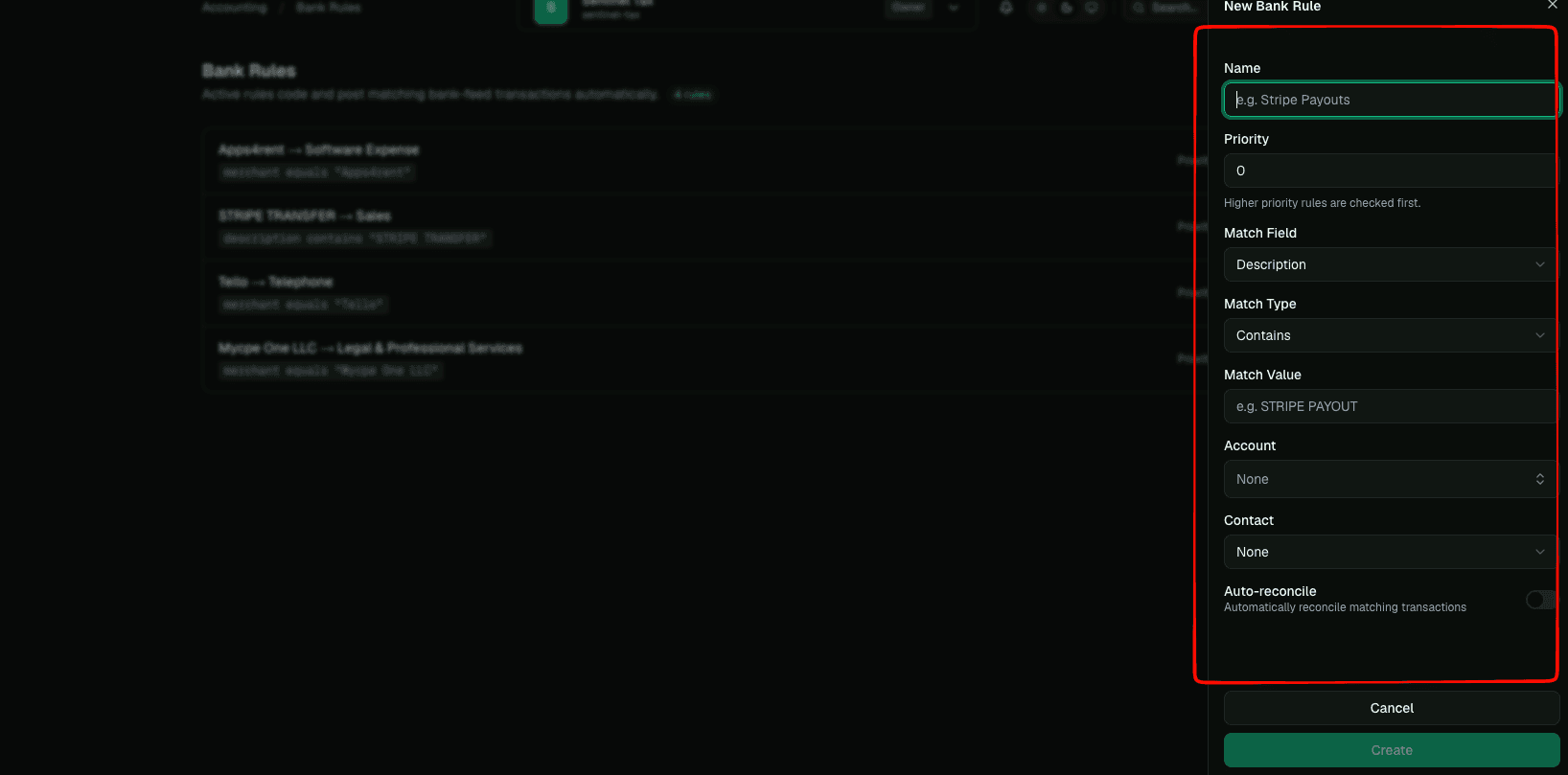
Use rules for stable, high-confidence patterns: payroll providers, loan payments, recurring software subscriptions, merchant processors, bank fees, known insurance drafts, and other descriptions that keep arriving with the same recognizable text. Avoid rules for vague words that could match unrelated transactions.
Higher-priority rules are checked first. This matters when two rules could match the same bank row. Put the more specific rule above the more general rule so a precise match wins.
Backtest A Rule Before You Trust It
You do not have to guess what a rule will do. Before a rule becomes an auto-posting instruction, LedgerHQ backtests the draft against the account's recent history — the last ninety days by default — and reports what it would have caught: how many rows matched, how many of those were already coded, how many were already posted, and which accounts those matches were actually coded to, largest group first.
That backtest is also a safety gate, not just a preview. If the matching rows in history were coded inconsistently — some to fuel, some to meals, some to office supplies — LedgerHQ will not mint an auto-post rule from them, because a rule that would have posted the same pattern several different ways is not a confident instruction. A draft only earns auto-posting when its history agrees on one account. The same check flags an overbroad rule whose match text is catching far more, or more varied, activity than you intended.
Because the backtest reads history you already have, the fastest way to sanity check a new rule is to ask Tally what it would have coded before you turn it on. Review the matched count and the account breakdown: if the breakdown is a single clean account, the rule is safe to auto-post; if it is spread across several accounts, tighten the match text or leave the rule as code-only.
Rules Are Versioned
A rule is not frozen at creation. As a vendor's treatment changes — a new account, a tighter match value, an amount range, a different priority — you edit the same rule instead of deleting it and starting over. LedgerHQ keeps the history for you: every rule has a current version and an immutable snapshot of each earlier version, including who made the change.
Only a real change creates a new version. Saving a rule without changing anything meaningful does not manufacture a history entry, and even retiring or deactivating a rule is recorded as a version rather than erasing it. This means you can evolve a rule confidently, knowing that what it looked like before — and therefore how it coded past transactions — is preserved and attributable.
What Rule Coding Does
When an active rule matches an uncoded, unposted, non-excluded bank feed row, LedgerHQ applies the rule's account and related coding fields to the row. The row can then show as Rule coded in Bank Feeds. That label means the row was pre-coded by an active rule and is ready for the normal posting checks.
Rule coding does not overwrite a human choice. If a user manually recodes a row away from the rule's account, the manual decision wins. Rules are meant to handle repetitive untouched rows, not fight user review.
Rules also apply to rows that arrived before the rule was created. If you add or edit a rule after feed activity has already synced, LedgerHQ can still code matching uncoded rows that remain unposted and eligible.
How Rule Auto-Posting Works
Active rules can post matching bank feed rows automatically when the row is coded to the same account as the matching rule and has no posting warnings. Rules are treated as a firm instruction: if the active rule confidently matches a clean row, LedgerHQ can post it through the same posting path a user would use. AI suggestions use the same atomic accounting posting path when they meet the managing firm's confidence threshold.
Rule auto-posting still respects safety gates. LedgerHQ does not auto-post rows that are pending at the bank, excluded, already posted, missing an account, zero-dollar, suspected duplicates, suspected transfers, removed by the provider, or otherwise carrying warnings that require human confirmation.
A bank rule is powerful because it can code and post repeating transactions. Create narrow rules, review new rules after they run, and disable or edit a rule if it starts catching the wrong transactions.
How AI Suggestions Work
Rows without matching rules can still get help from LedgerHQ's suggestion system. Bank Feeds can show Suggest categories for the currently visible uncoded rows. LedgerHQ reviews transaction details, available history, and the company chart of accounts, then returns only suggestions it considers confident enough to show.
When a suggestion is applied, the row can show as Suggested. That means the account was filled from a suggestion, not from a bank rule. Users can change the account before posting. Suggested rows are still reviewable; they are not automatically correct just because they are convenient.
If no confident suggestion is found, LedgerHQ leaves the row uncoded. That is intentional. It is better to leave a row for human review than to create a misleading category.
How AI Posting Works
AI research can suggest or pre-code an account. When AI auto-post is on for the company and a suggestion meets the managing firm's confidence threshold, it can post automatically through the normal accounting path. New companies start with AI auto-post off. Turn it on from the Bank Feeds page header — it stays visible even when there are no ready-to-post rows.
The confidence threshold is one firm policy for every managed company. Active bank rules post independently of the AI auto-post switch.
Lower-confidence suggestions remain for review and can be posted with Post all coded or a row-level posting action. If a person has selected a different category, that human choice wins and AI does not overwrite it. A successful AI post also creates a rule so the confirmed vendor treatment becomes a repeatable firm instruction.
What Users Should Review
Review the first few runs of any new rule. Check whether the match text is too broad, whether the account is correct, and whether any transactions should be handled as transfers, credit card payments, loan movements, owner activity, or matches to existing register entries instead of simple expense or income coding.
For AI suggestions, review the payee, description, amount, suggested account, and any warning evidence. Use Post all coded only when the visible coded rows are routine and warning-free. If a row looks unusual, leave it unposted and ask Tally or create a support ticket with the company name, transaction date, amount, description, and what looks wrong.